







Question: Create a java file: - Declare a variable, myF ileName , of type String , and assign it the value R eadFileLineByLine .txt . Remember
Create a java file:
- Declare a variable, myF ileName , of type String , and assign it the value R eadFileLineByLine .txt . Remember that Strings are enclosed by double quotes.
- Declare a variable, myFile , of type File , and assign it to be a new instance of the File class. Recall from lecture that to d eclare a new instance of a Class of type File , that references a specific filename , you would write: File file = new File(myFileName);
- Declare a variable, inputFile , of type Scanner , and assign it to be a new instance of the Scanner class. Give the Scanner class constructor the variable myFile as the single argument. As you've already done before several times, use the following template: Scanner inputFile = new Scanner(file);
- Dec lare a variable, loopNum , of type int , and assign it the value 0
- Use a while loop, whose conditional is the following: inputFile.hasNext() hasNext(). This while loop will iterate through its body as long as the reference to inputFile is not yet pointing to the end of the file. At each iteration of the while loop:
+ Increment loopNum by 1
+ Declare variable fileLine as a String , and assign it the value inputFile.nextLine()
+ Write an if statement, that checks if l oopNum modulus 7 is equal to zero; if it is then use System.out.println to print to the screen the value stored in fileLine
- Close the file by issuing inputFile.close();
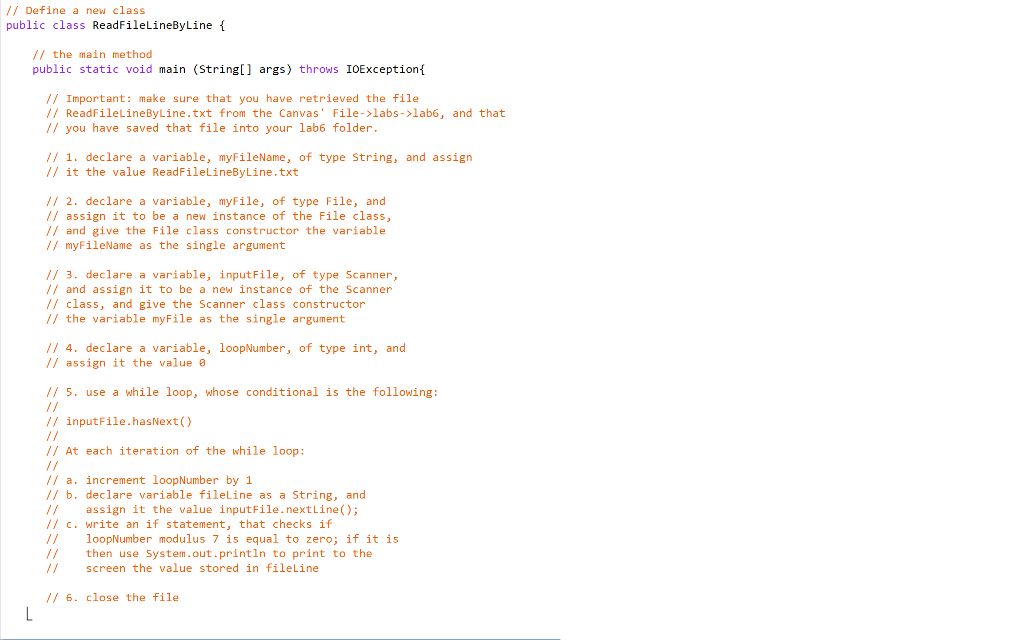
// Define a new class public class ReadFileLineByLine { // the main method public static void main (String[] args) throws IOException{ // Important: make sure that you have retrieved the file // ReadFileLineByLine.txt from the Canvas' File->labs->labb, and that // you have saved that file into your lab6 folder. 1/ 1. declare a variable, myFileName, of type String, and assign // it the value ReadFileLineByLine.txt 1/ 2. declare a variable, myFile, of type File, and // assign it to be a new instance of the file class, // and give the File class constructor the variable // myFileName as the single argument 1/ 3. declare a variable, input File, of type Scanner, // and assign it to be a new instance of the Scanner // class, and give the Scanner class constructor // the variable myFile as the single argument // 4. declare a variable, loopNumber, of type int, and 1/ assign it the value o // 5. use a while loop, whose conditional is the following: // inputFile.hasNext() // At each iteration of the while loop: increment loopNumber by 1 // b. declare variable fileLine as a String, and assign it the value inputFile.nextLine(); // c. write an if statement, that checks if loopNumber modulus 7 is equal to zero; if it is // then use System.out.println to print to the screen the value stored in fileline 1/ 6. close the file
Step by Step Solution
There are 3 Steps involved in it

Get step-by-step solutions from verified subject matter experts
 Study Help