







Question: Create a new XLS file named: Assignment 8 _ Access _ DataFile _ YourName.xls Add the AdventureWorks DW 2 0 1 2 database to your
Create a new XLS file named: AssignmentAccessDataFileYourName.xls
Add the AdventureWorks DW database to your XLS file. Add the same tables to your XLS file.
Using DAX to create a calculated field that counts the number of products.
Create the same PivotTable as above.
Submit both XLS files into the appropriate dropbox in DL
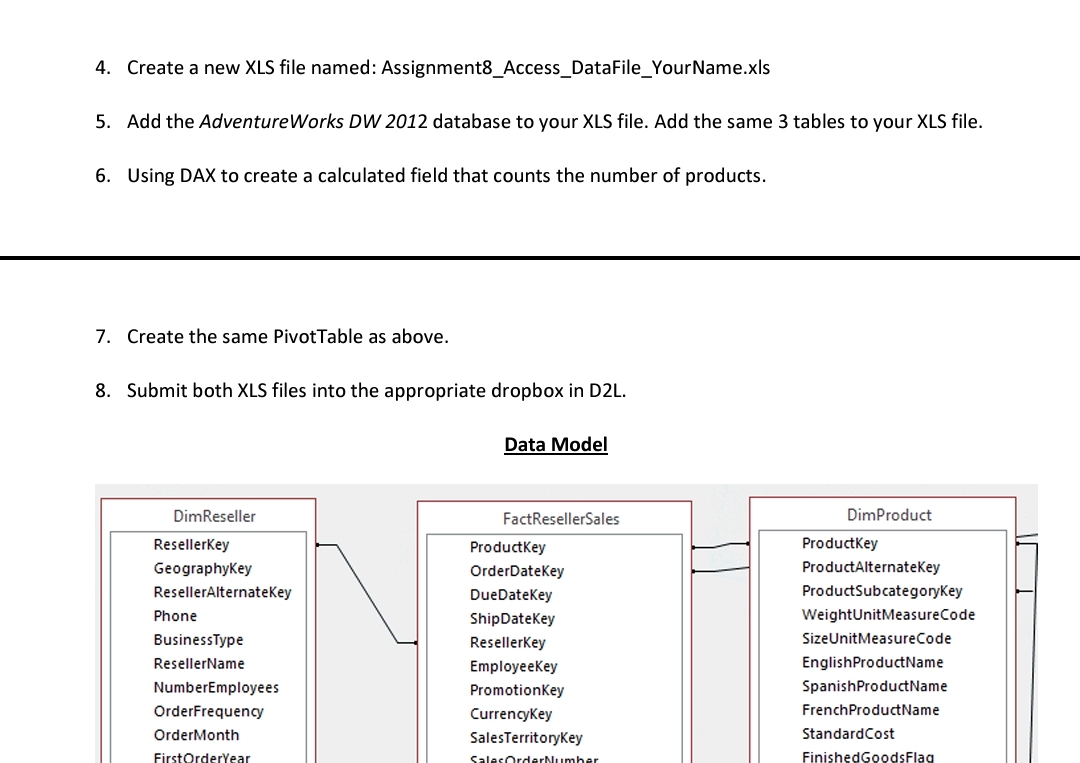
Data Model
tableDimResellerFactResellerSales,DimProductResellerKeyProductKey,ProductKeyGeographyKeyOrderDateKey,ProductAlternateKeyResellerAlternateKeyDueDateKey,ProductSubcategoryKeyPhoneShipDateKey,WeightUnitMeasureCodeBusinessTypeResellerKey,SizeUnitMeasureCodeResellerNameEmployeeKey,EnglishProductNameNumberEmployeesPromotionKey,SpanishProductNameOrderFrequencyCurrencyKey,FrenchProductNameOrderMonthSalesTerritoryKey,StandardCost
Step by Step Solution
There are 3 Steps involved in it
1 Expert Approved Answer
Step: 1 Unlock

Question Has Been Solved by an Expert!
Get step-by-step solutions from verified subject matter experts
Step: 2 Unlock
Step: 3 Unlock
 Study Help