







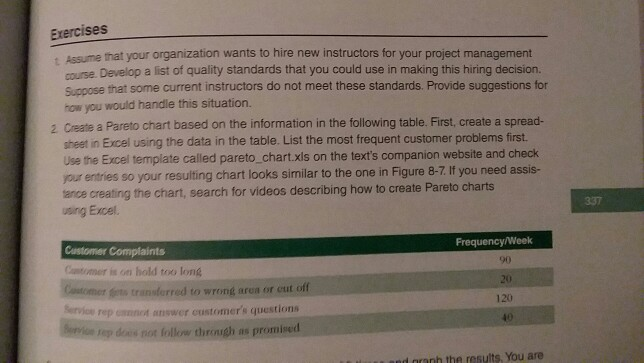
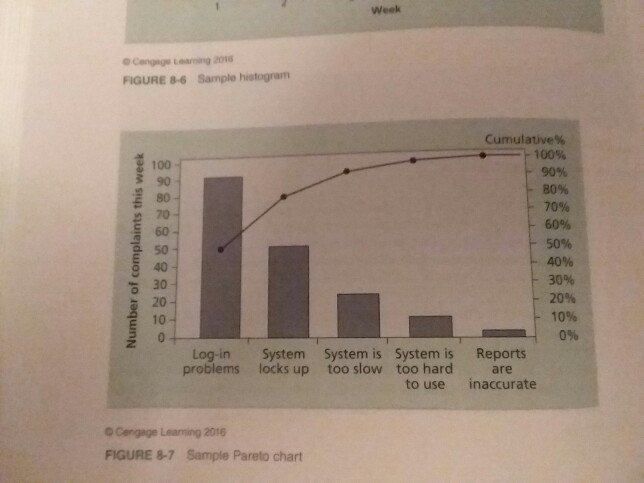
Question: Create a Pareto chart based on the information in the table on page 337 exercise #2. Check your entries so your resulting chart looks similar
Create a Pareto chart based on the information in the table on page 337 exercise #2.
Check your entries so your resulting chart looks similar to the one in Figure 8-7
PLEASE MAKE COPY PASTE AVAILABLE
Exercises Assume that your organization wants to hire new instructors for your project management course. Develop a list of quality standards that you could use in making this hiring decision. Suppose that some current instructors do not meet these standards. Provide suggestions for how you would handle this situation. 2 Create a Pareto chart based on the information in the following table. First, create a spread- sheet in Excel using the data in the table. List the most frequent customer problems first. Use the Excel template called pareto_chart.xls on the text's companion website and check your entries so your resulting chart looks similar to the one in Figure 8-7.If you need assis- ance creating the chart, search for videos describing how to create Pareto charts using Excel. 337 Customer Complaints Cantomer is on hold too long Cotoer ferts transterred to wrong area or eut of Frequency/Week 90 120 rep cannot answer customers questions rep does not follow thrinsgh as promised d nnh the results, You are
Step by Step Solution
There are 3 Steps involved in it

Get step-by-step solutions from verified subject matter experts
 Study Help