







Question: create a payroll register for audio warehouse Create a Payroll Register for Audio Warenouse 1. Oren EA7-R1-Payroll from yart Chaper or Logical category and then
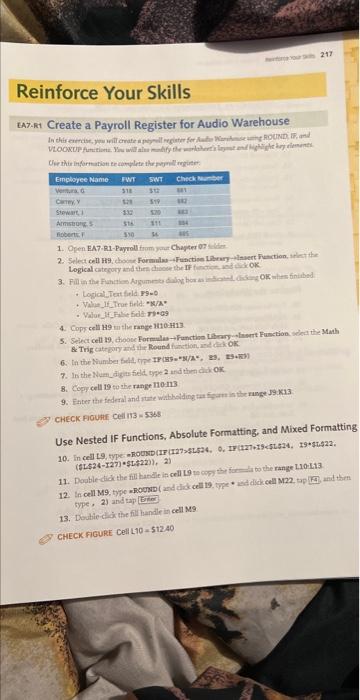
Create a Payroll Register for Audio Warenouse 1. Oren EA7-R1-Payroll from yart Chaper or Logical category and then dhoose the If firatiend kis ok. - Logical Teat field r9-9 + Value If True firld: "sian". - Walue fiffilit fidt riseg9 4. Cops cell H9 m the rance lt10.it13. 5. Select cell 19, dhooce Forpulus- Function tibrar olasrt Function sdea the Madh B. Trig catroing and ine Round function, in ckiok. 7. In the Rum aigus field eype 2 und then dick ox. 8. copry cell 19 so the range 110m3. 9. Fater the fedral and gute wathoiding tat figere is the runge 19Ka3 CHECKAIOUHI Cell 113 = 536 : Use Nested If Functions, Absolute Formatting, and Mixed Formatting ($L$24127)(5,22)),2) 11. Double-dick the fil handle is cell 19m cop the far to the range 1.10113 type, 2) and tap [tref 13. Dautie-cio the fill handle in cell M9 CHECK FIGURE Cell L10=512.40 Create a Payroll Register for Audio Warenouse 1. Oren EA7-R1-Payroll from yart Chaper or Logical category and then dhoose the If firatiend kis ok. - Logical Teat field r9-9 + Value If True firld: "sian". - Walue fiffilit fidt riseg9 4. Cops cell H9 m the rance lt10.it13. 5. Select cell 19, dhooce Forpulus- Function tibrar olasrt Function sdea the Madh B. Trig catroing and ine Round function, in ckiok. 7. In the Rum aigus field eype 2 und then dick ox. 8. copry cell 19 so the range 110m3. 9. Fater the fedral and gute wathoiding tat figere is the runge 19Ka3 CHECKAIOUHI Cell 113 = 536 : Use Nested If Functions, Absolute Formatting, and Mixed Formatting ($L$24127)(5,22)),2) 11. Double-dick the fil handle is cell 19m cop the far to the range 1.10113 type, 2) and tap [tref 13. Dautie-cio the fill handle in cell M9 CHECK FIGURE Cell L10=512.40
Step by Step Solution
There are 3 Steps involved in it

Get step-by-step solutions from verified subject matter experts
 Study Help