







Question: Create a project named Date. NetBeans will create a class with the same name, Date. The Date class that NetBeans creates will have a main
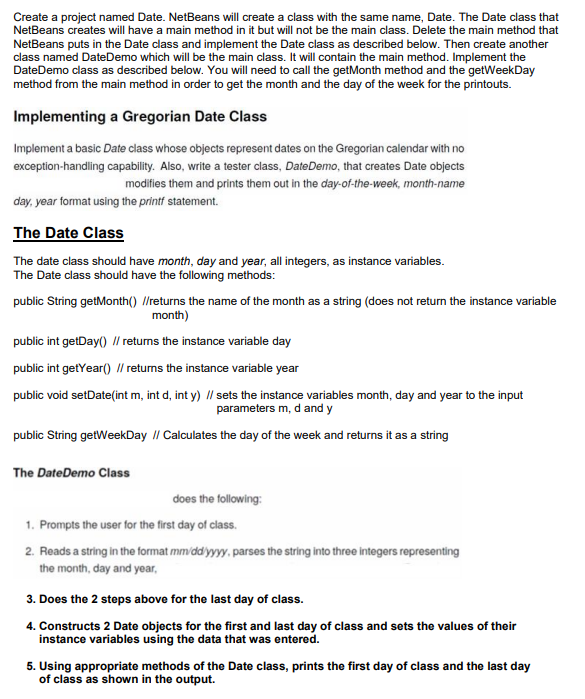
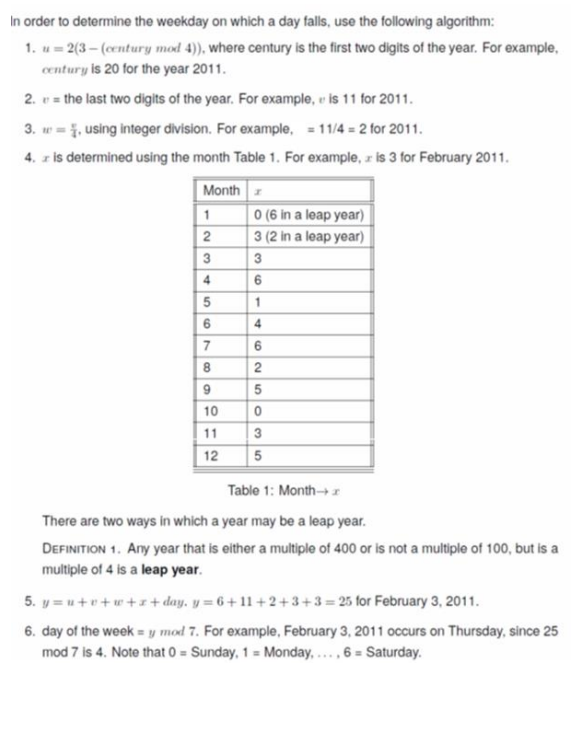
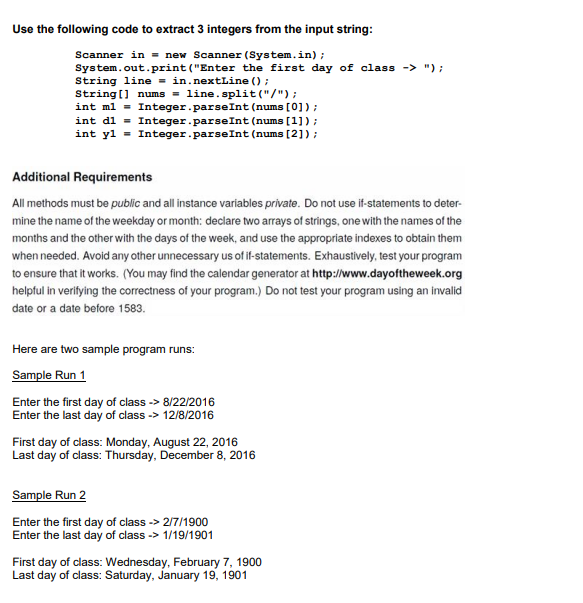
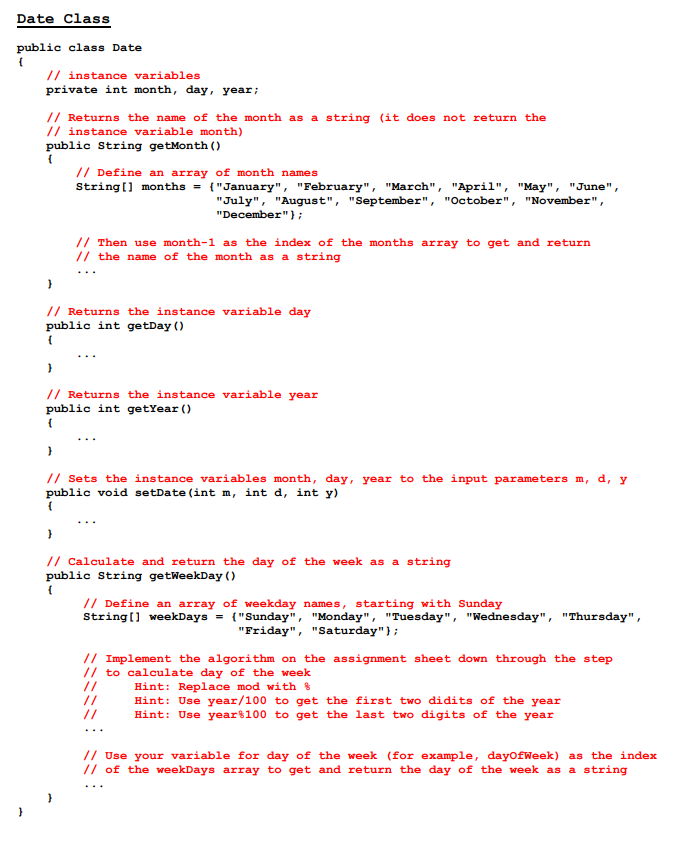
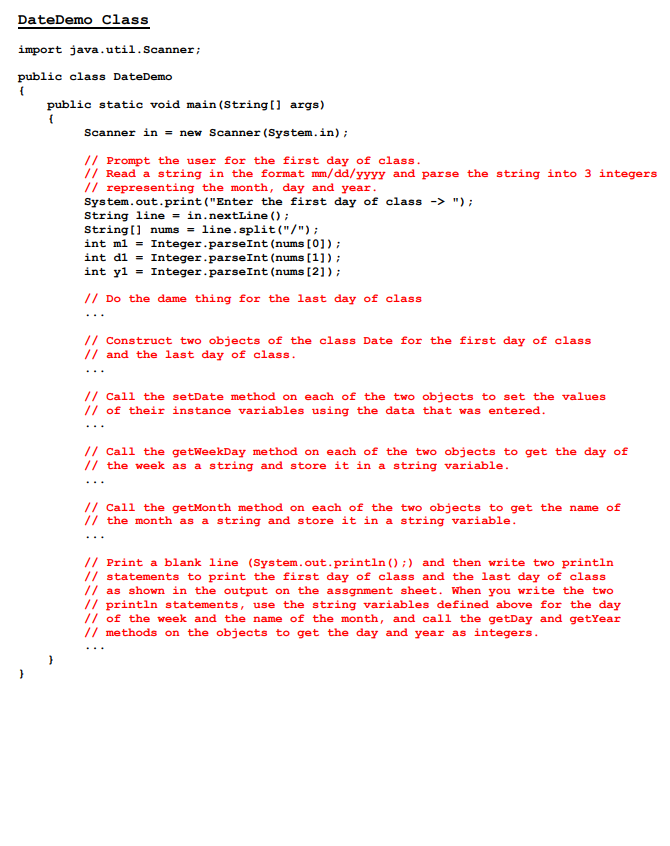
Create a project named Date. NetBeans will create a class with the same name, Date. The Date class that NetBeans creates will have a main method in it but will not be the main class. Delete the main method that NetBeans puts in the Date class and implement the Date class as described below. Then create another class named DateDemo which will be the main class. It will contain the main method. Implement the DateDemo class as described below. You will need to call the getMonth method and the getWeekDay method from the main method in order to get the month and the day of the week for the printouts. Implementing a Gregorian Date Class Implement a basic Date class whose objects represent dates on the Gregorian calendar with no exception-handling capability. Also, write a tester class, DateDemo, that creates Date objects modifies them and prints them out in the day-of-the-week, month-name day, year format using the printf statement. The Date Class The date class should have month, day and year, all integers, as instance variables. The Date class should have the following methods: public String getMonth() //returns the name of the month as a string (does not return the instance variable month) public int getDay() // retums the instance variable day public int getYear() // returns the instance variable year public void setDate(int m, int d, int y) // sets the instance variables month, day and year to the input parameters m,d and y public String getWeekDay // Calculates the day of the week and returns it as a string The DateDemo Class does the following: 1. Prompts the user for the first day of class. 2. Reads a string in the format mmddyyyy, parses the string into three integers representing the month, day and year, 3. Does the 2 steps above for the last day of class. 4. Constructs 2 Date objects for the first and last day of class and sets the values of their In order to determine the weekday on which a day falls, use the following algorithm: 1. u=2(3(ccntury mod 4)), where century is the first two digits of the year. For example, century is 20 for the year 2011. 2. v= the last two digits of the year. For example, v is 11 for 2011. 3. w=4, using integer division. For example, =11/4=2 for 2011 . 4. x is determined using the month Table 1. For example, x is 3 for February 2011. Table 1: Month x There are two ways in which a year may be a leap year. Definition 1. Any year that is either a multiple of 400 or is not a multiple of 100, but is a multiple of 4 is a leap year. 5. y=u+v+w+x+ day. y=6+11+2+3+3=25 for February 3, 2011. 6. day of the week =y mod 7. For example, February 3, 2011 occurs on Thursday, since 25 mod7 is 4 . Note that 0= Sunday, 1= Monday, .., 6= Saturday. Use the following code to extract 3 integers from the input string: Scanner in = new Scanner(System.in); System. out.print ("Enter the first day of class ("); String line = in. nextLine (); String[] nums = line.split ("/"); int m1 = Integer.parseInt (nums [0]); int d1 = Integer parseInt (nums [1]); int y1= Integer parseInt (nums [2]); Additional Requirements All methods must be public and all instance variables private. Do not use if-statements to determine the name of the weekday or month: declare two arrays of strings, one with the names of the months and the other with the days of the week, and use the appropriate indexes to obtain them when needed. Avoid any other unnecessary us of if-statements. Exhaustively, test your program to ensure that it works. (You may find the calendar generator at http://www.dayoftheweek.org helpful in verifying the correctness of your program.) Do not test your program using an invalid date or a date before 1583. Here are two sample program runs: Sample Run 1 Enter the first day of class >>/22/2016 Enter the last day of class >>12/8/2016 First day of class: Monday, August 22, 2016 Last day of class: Thursday, December 8, 2016 Sample Run 2 Enter the first day of class >2/7/1900 Enter the last day of class >1/19/1901 First day of class: Wednesday, February 7, 1900 Last day of class: Saturday, January 19, 1901 Date Class public class Date f // instance variables private int month, day, year; // Returns the name of the month as a string (it does not return the // instance variable month) public string getMonth() f // Define an array of month names String[] months = \{"January", "February", "March", "April", "May", "June", "July", "August", "September", "October", "November", "December" ?; // Then use month-1 as the index of the months array to get and return // the name of the month as a string 1 // Returns the instance variable day public int getDay () f ) // Returns the instance variable year public int getYear() f ) // Sets the instance variables month, day, year to the input parameters m,d,y public void setDate (int m, int d, int y ) f ) // Calculate and return the day of the week as a string public string getWeekDay () f // Define an array of weekday names, starting with Sunday String[] weekDays = { "Sunday", "Monday", "Tuesday", "Wednesday", "Thursday", "Friday", "Saturday" ; // Implement the algorithm on the assignment sheet down through the step // to calculate day of the week // Hint: Replace mod with of // Hint: Use year/100 to get the first two didits of the year // Hint: Use year8100 to get the last two digits of the year // Use your variable for day of the week (for example, dayofWeek) as the indes // of the weekDays array to get and return the day of the week as a string ... \} Class rt java.util. Scanner; ic class DateDemo public static void main(String[] args) \{ Scanner in = new Scanner (System.in); // Prompt the user for the first day of class. // Read a string in the format mm/dd/yYYY and parse the string into 3 integer: // representing the month, day and year. System.out.print("Enter the first day of class "); String line = in. nextLine (); String[] nums = line.split("/"); int m1= Integer .parseInt (nums [0]); int d1 = Integer parseInt (nums [1]); int y1= Integer . parseInt (nums [2]); // Do the dame thing for the last day of class // Construct two objects of the class Date for the first day of class // and the last day of class. // Call the setDate method on each of the two objects to set the values // of their instance variables using the data that was entered. // Call the getWeekDay method on each of the two objects to get the day of // the week as a string and store it in a string variable. // Call the getMonth method on each of the two objects to get the name of // the month as a string and store it in a string variable. // Print a blank line (System.out.println(); ) and then write two println // statements to print the first day of class and the last day of class I/ as shown in the output on the assgnment sheet. When you write the two // println statements, use the string variables defined above for the day // of the week and the name of the month, and call the getDay and getYear // methods on the objects to get the day and year as integers. .. \}
Step by Step Solution
There are 3 Steps involved in it

Get step-by-step solutions from verified subject matter experts
 Study Help