



Question: Create a Query Rey Rivera, a counselor in the center, would like your assistance in helping him find certain infor mation. You will create a
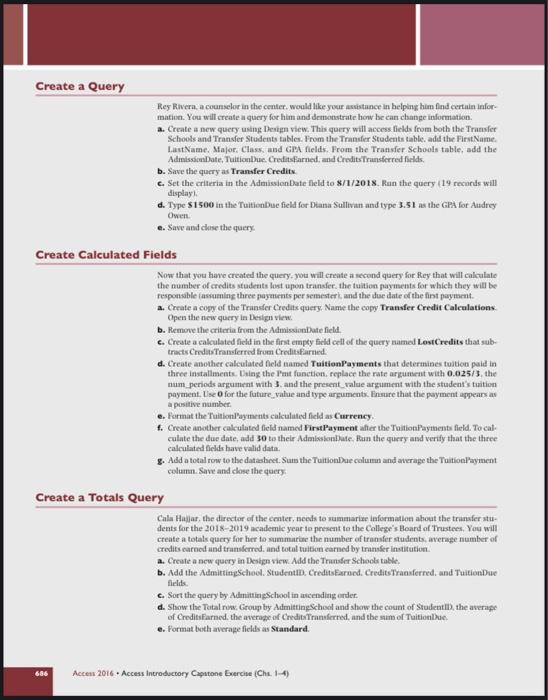
Create a Query Rey Rivera, a counselor in the center, would like your assistance in helping him find certain infor mation. You will create a query for him and demonstrate how he can change information a. Create a new query using Design view. This query will access fields from both the Transfer Schools and Transfer Students tables. From the Transfer Students table, add the First Name LastName. MajorClass, and GPA fields. From the Transfer Schools table, add the Admissionate Tuition Creditsbarned, and Credits Transferred fields b. Save the query as Transfer Credits c. Set the criteria in the Admission Date field to 8/1/2018. Ran the query (19 seconds will display d. Type S1500 in the Tuitiombue field for Diana Sullivan and type 3.51 as the GPA for Audrey Owen. e. Save and cline the query Create Calculated fields Now that you have created the query, you will create a second query for Key that will calculate the number of credits students lost upon transfer the tuition payments for which they will be responsible fassuming three payments per semester, and the due date of the first payment. a. Create a copy of the Transfer Credits query Name the copy Transfer Credit Calculations Open the new query in Design View b. Remove the criteria from the AdmissionDate field c. Create a calculated field in the first empty field cell of the query named Lost Credits that sub tracts Credit Transferred from Credit Banned d. Create another calculated field named Tuition Payments that determines tuition paid in three installments. Using the I'mt function, replace the rate argument with 0.025/5, the mum periods argument with 3, and the present_value argument with the student's tation payment. Use O for the future_value and type arguments. Ensure that the payment appears as a positive number e. Format the Muition'yments calculated field as Currency, f. Create another calculated field named First Payment after the rationaments field. To cal culate the due date, add 30 to their Admissionate. Run the query and verify that the three calculated fields haver valid data 3. Add a total tow to the datasheet. Sam the TuitionBae columun and average the TuitionBayment column. Save and close the query Create a Totals Query Cala Hajar, the director of the center, needs to summarize information about the transfer stu dents for the 2018-2019 academic year to present to the College's Board of Trustees. You will create a total query for her to summarine the number of transfer students, average number of credits earned and transferred, and total tuition earned by transfer institution a. Create a new query in Design view. Add the Transfer Schools table. b. Add the AdmittingSchool. Studentlit. Creditroed. Credits Transferred. and TuitionDue fields c. Sort the query by AdmittingSchool in wending order. d. Show the Total row. Group by Admitting School and show the count of Student, the average of Creditsfarnedthe average of Credit Transferred, and the sum of Tuition e. Format both average fields as Standard. Accent 2016. Access Introductory Capstone Exercise (Chs 1-4) Create a Query Rey Rivera, a counselor in the center, would like your assistance in helping him find certain infor mation. You will create a query for him and demonstrate how he can change information a. Create a new query using Design view. This query will access fields from both the Transfer Schools and Transfer Students tables. From the Transfer Students table, add the First Name LastName. MajorClass, and GPA fields. From the Transfer Schools table, add the Admissionate Tuition Creditsbarned, and Credits Transferred fields b. Save the query as Transfer Credits c. Set the criteria in the Admission Date field to 8/1/2018. Ran the query (19 seconds will display d. Type S1500 in the Tuitiombue field for Diana Sullivan and type 3.51 as the GPA for Audrey Owen. e. Save and cline the query Create Calculated fields Now that you have created the query, you will create a second query for Key that will calculate the number of credits students lost upon transfer the tuition payments for which they will be responsible fassuming three payments per semester, and the due date of the first payment. a. Create a copy of the Transfer Credits query Name the copy Transfer Credit Calculations Open the new query in Design View b. Remove the criteria from the AdmissionDate field c. Create a calculated field in the first empty field cell of the query named Lost Credits that sub tracts Credit Transferred from Credit Banned d. Create another calculated field named Tuition Payments that determines tuition paid in three installments. Using the I'mt function, replace the rate argument with 0.025/5, the mum periods argument with 3, and the present_value argument with the student's tation payment. Use O for the future_value and type arguments. Ensure that the payment appears as a positive number e. Format the Muition'yments calculated field as Currency, f. Create another calculated field named First Payment after the rationaments field. To cal culate the due date, add 30 to their Admissionate. Run the query and verify that the three calculated fields haver valid data 3. Add a total tow to the datasheet. Sam the TuitionBae columun and average the TuitionBayment column. Save and close the query Create a Totals Query Cala Hajar, the director of the center, needs to summarize information about the transfer stu dents for the 2018-2019 academic year to present to the College's Board of Trustees. You will create a total query for her to summarine the number of transfer students, average number of credits earned and transferred, and total tuition earned by transfer institution a. Create a new query in Design view. Add the Transfer Schools table. b. Add the AdmittingSchool. Studentlit. Creditroed. Credits Transferred. and TuitionDue fields c. Sort the query by AdmittingSchool in wending order. d. Show the Total row. Group by Admitting School and show the count of Student, the average of Creditsfarnedthe average of Credit Transferred, and the sum of Tuition e. Format both average fields as Standard. Accent 2016. Access Introductory Capstone Exercise (Chs 1-4)
Step by Step Solution
There are 3 Steps involved in it

Get step-by-step solutions from verified subject matter experts