





Question: Create a sequence diagram with the call to runControlPanelTest( ) as the founding message. Include only the relevant objects in the diagram. Use an interaction
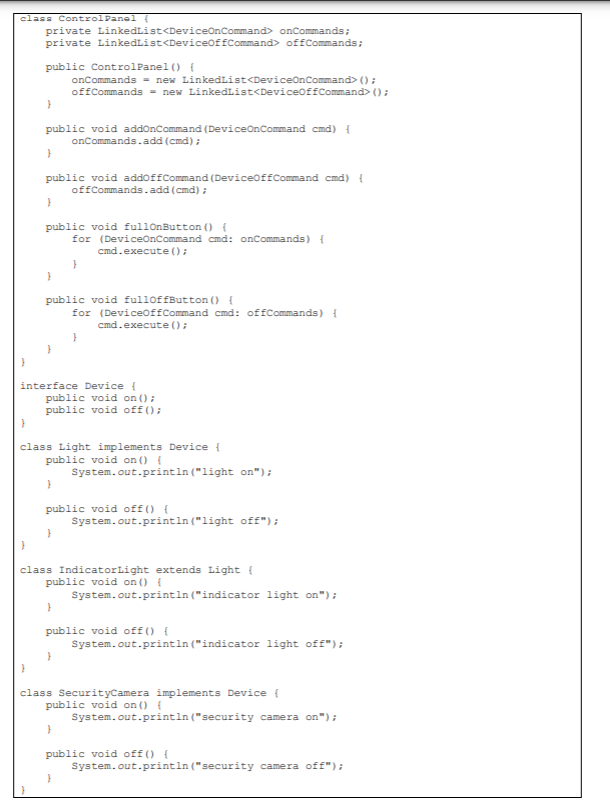
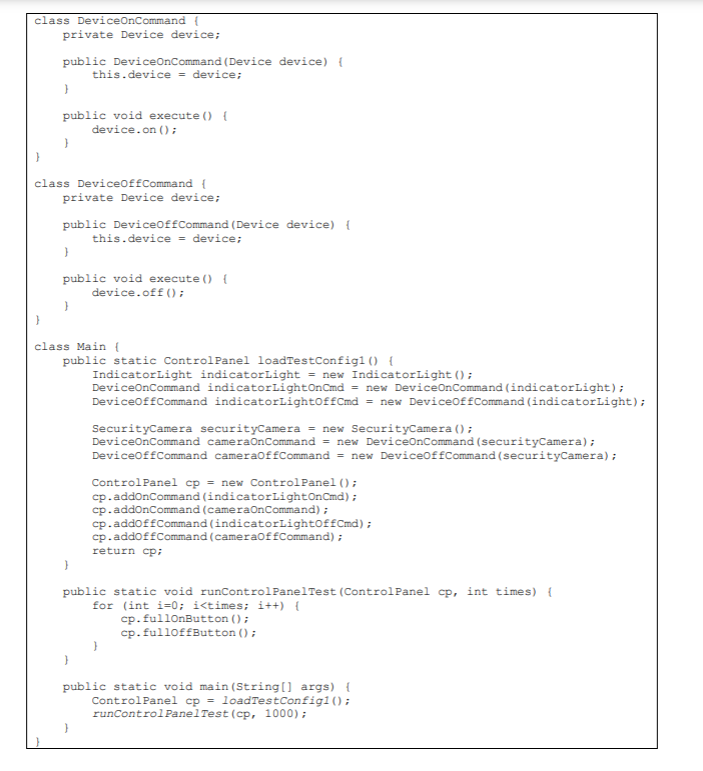
 Create a sequence diagram with the call to runControlPanelTest( ) asthe founding message. Include only the relevant objects in the diagram. Use

Create a sequence diagram with the call to runControlPanelTest( ) as the founding message. Include only the relevant objects in the diagram. Use an interaction frame to describe the test loop in Main. For the loops in ControlPanel, show the actual messages they will send, in other words imagine they are not loops but a series of calls to specific objects.

class Control Panel private Linkedlist onCommands; private LinkedList offCommands; public Control Panel() { onCommands = new LinkedList(); offCommands = new LinkedList(); public void addonCommand (DeviceOnCommand cmd) { onCommands.add (cmd); } public void addoff Command (DeviceOfCommand cmd) { of Commands.add(cmd); } public void fullOnButton() { for (DeviceOnCommand cmd: onCommands) { cmd.execute(); } public void fulloffButton() { for (DeviceoffCommand cmd: offCommands) { cmd.execute(); interface Device { public void on(); public void off(); class Light implements Device { public void on() { System.out.println("light on"); public void off() { System.out.println("light off"); } class Indicator Light extends Light public void on() { System.out.println("indicator light on"); } public void off() { System.out.println("indicator light off"); class SecurityCamera implements Device { public void on() { System.out.println("security camera on"); public void off() { System.out.println("security camera off"); class DeviceOnCommand private Device device; public DeviceOnCommand (Device device) { this.device = device; } public void execute() { device.on(); class DeviceOffCommand { private Device device; public DeviceOfCommand (Device device) { this.device = device; } public void execute() { device.off(); } class Main public static Control Panel loadTestConfigi () { Indicator Light indicator Light = new IndicatorLight(); DeviceOnCommand indicatorLightOnCmd = new DeviceOnCommand (indicatorLight); DeviceoffCommand indicatorLightoffCmd = new DeviceOfCommand (indicator Light); SecurityCamera securityCamera = new SecurityCamera(); DeviceonCommand cameran Command = new DeviceOnCommand (securityCamera); DeviceOffCommand cameraoffCommand = new DeviceOffCommand (securityCamera); Control Panel cp = new Control Panel(); cp.addonCommand (indicator LightOnCmd); cp.addonCommand (cameraOnCommand); cp.addoffCommand (indicatorLightoffCmd); cp.addoffCommand (cameraoffCommand); return cp; 1 public static void runControl PanelTest (Control Panel cp, int times) { for (int i=0; i

Step by Step Solution

There are 3 Steps involved in it

1 Expert Approved Answer
Step: 1 Unlock blur-text-image
Question Has Been Solved by an Expert!

Get step-by-step solutions from verified subject matter experts

Step: 2 Unlock
Step: 3 Unlock

Students Have Also Explored These Related Databases Questions!