


Question: Create a communication diagram with the call to runControlPanelTest( ) as the initiating message. Include only the relevant objects in the diagram. Use the flat
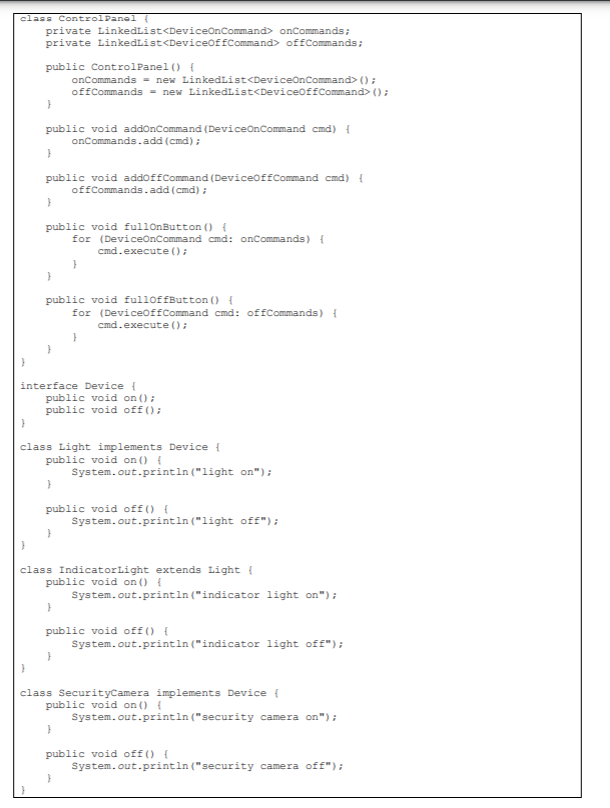
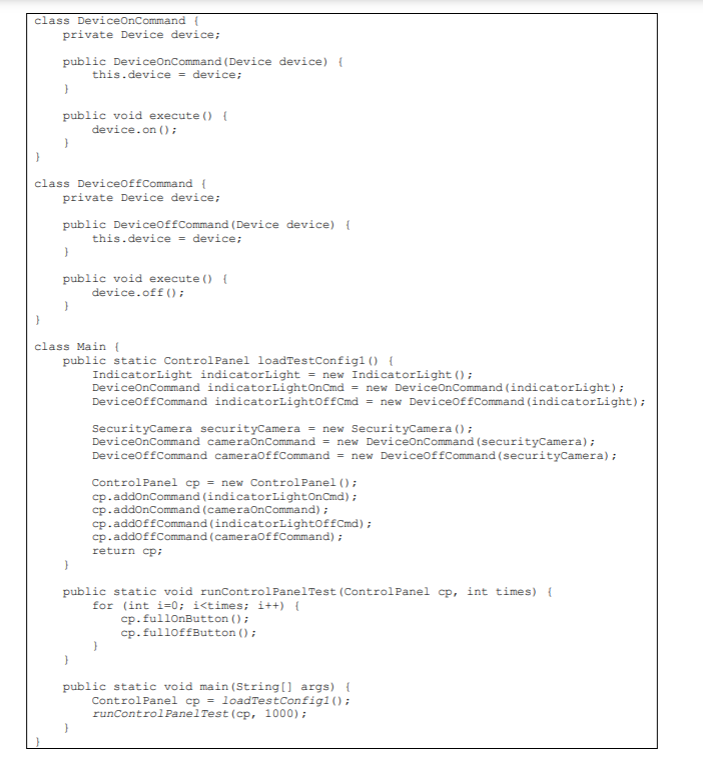
Create a communication diagram with the call to runControlPanelTest( ) as theinitiating message. Include only the relevant objects in the diagram. Use theCreate a communication diagram with the call to runControlPanelTest( ) as the initiating message. Include only the relevant objects in the diagram. Use the flat numbering scheme described by Folwer in the reading.

class Control Panel private Linkedlist onCommands; private LinkedList offCommands; public Control Panel() { onCommands = new LinkedList(); offCommands = new LinkedList(); public void addonCommand (DeviceOnCommand cmd) { onCommands.add (cmd); } public void addoff Command (DeviceOfCommand cmd) { of Commands.add(cmd); } public void fullOnButton() { for (DeviceOnCommand cmd: onCommands) { cmd.execute(); } public void fulloffButton() { for (DeviceoffCommand cmd: offCommands) { cmd.execute(); interface Device { public void on(); public void off(); class Light implements Device { public void on() { System.out.println("light on"); public void off() { System.out.println("light off"); } class Indicator Light extends Light public void on() { System.out.println("indicator light on"); } public void off() { System.out.println("indicator light off"); class SecurityCamera implements Device { public void on() { System.out.println("security camera on"); public void off() { System.out.println("security camera off"); class DeviceOnCommand private Device device; public DeviceOnCommand (Device device) { this.device = device; } public void execute() { device.on(); class DeviceOffCommand { private Device device; public DeviceOfCommand (Device device) { this.device = device; } public void execute() { device.off(); } class Main public static Control Panel loadTestConfigi () { Indicator Light indicator Light = new IndicatorLight(); DeviceOnCommand indicatorLightOnCmd = new DeviceOnCommand (indicatorLight); DeviceoffCommand indicatorLightoffCmd = new DeviceOfCommand (indicator Light); SecurityCamera securityCamera = new SecurityCamera(); DeviceonCommand cameran Command = new DeviceOnCommand (securityCamera); DeviceOffCommand cameraoffCommand = new DeviceOffCommand (securityCamera); Control Panel cp = new Control Panel(); cp.addonCommand (indicator LightOnCmd); cp.addonCommand (cameraOnCommand); cp.addoffCommand (indicatorLightoffCmd); cp.addoffCommand (cameraoffCommand); return cp; 1 public static void runControl PanelTest (Control Panel cp, int times) { for (int i=0; i onCommands; private LinkedList offCommands; public Control Panel() { onCommands = new LinkedList(); offCommands = new LinkedList(); public void addonCommand (DeviceOnCommand cmd) { onCommands.add (cmd); } public void addoff Command (DeviceOfCommand cmd) { of Commands.add(cmd); } public void fullOnButton() { for (DeviceOnCommand cmd: onCommands) { cmd.execute(); } public void fulloffButton() { for (DeviceoffCommand cmd: offCommands) { cmd.execute(); interface Device { public void on(); public void off(); class Light implements Device { public void on() { System.out.println("light on"); public void off() { System.out.println("light off"); } class Indicator Light extends Light public void on() { System.out.println("indicator light on"); } public void off() { System.out.println("indicator light off"); class SecurityCamera implements Device { public void on() { System.out.println("security camera on"); public void off() { System.out.println("security camera off"); class DeviceOnCommand private Device device; public DeviceOnCommand (Device device) { this.device = device; } public void execute() { device.on(); class DeviceOffCommand { private Device device; public DeviceOfCommand (Device device) { this.device = device; } public void execute() { device.off(); } class Main public static Control Panel loadTestConfigi () { Indicator Light indicator Light = new IndicatorLight(); DeviceOnCommand indicatorLightOnCmd = new DeviceOnCommand (indicatorLight); DeviceoffCommand indicatorLightoffCmd = new DeviceOfCommand (indicator Light); SecurityCamera securityCamera = new SecurityCamera(); DeviceonCommand cameran Command = new DeviceOnCommand (securityCamera); DeviceOffCommand cameraoffCommand = new DeviceOffCommand (securityCamera); Control Panel cp = new Control Panel(); cp.addonCommand (indicator LightOnCmd); cp.addonCommand (cameraOnCommand); cp.addoffCommand (indicatorLightoffCmd); cp.addoffCommand (cameraoffCommand); return cp; 1 public static void runControl PanelTest (Control Panel cp, int times) { for (int i=0; i

Step by Step Solution

There are 3 Steps involved in it

1 Expert Approved Answer
Step: 1 Unlock blur-text-image
Question Has Been Solved by an Expert!

Get step-by-step solutions from verified subject matter experts

Step: 2 Unlock
Step: 3 Unlock

Students Have Also Explored These Related Databases Questions!