







Question: Create a statistical calculator using HTML and JavaScript. (Must have both the HTML and JavsScript code) How it works: Type in numbers with spaces in
Create a statistical calculator using HTML and JavaScript. (Must have both the HTML and JavsScript code)
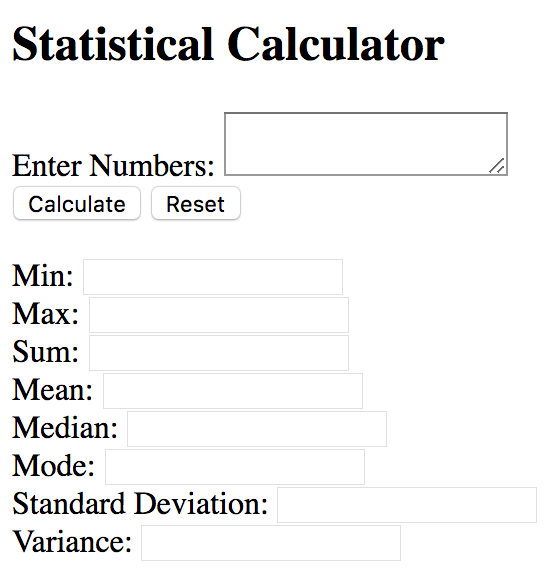
How it works: Type in numbers with spaces in between in the 'Enter Numbers' text box. Once the Calculate button is clicked, the textboxes (SHOULD BE READONLY) populate with the correct calculation.
HTML Page should look like:
NOTE: DO NOT duplicate any code. If a function performs a required operation, call that function rather than duplicate the code within another function.
For example, the calcMean() function calculates the sum of the array values before calculating the mean value; therefore, call the calcSum() function rather than calculating the sum in the calcMean() function.
Example #1
Entered Values: 5 3 10 0 3 2 10 3 7 8
| Max | Mean | Median | Min | Mode | Std Dev | Sum | Variance |
| 10.00 | 5.10 | 4.00 | 0.00 | 3 | 3.30 | 51.00 | 10.89 |
Example #2
Entered Values: 42 80 78 59 76 76 41 30 80 51 (contains two pairs of values)
| Max | Mean | Median | Min | Mode * | Std Dev | Sum | Variance |
| 80.00 | 61.30 | 67.50 | 30.00 | 76 80 | 18.13 | 613.00 | 328.61 |
* Bimodal and multimodal values can be displayed in any order.
Statistical Calculator Enter Numbers: Calculate Reset Min: Max: Sum: Mean: Median: Mode: Standard Deviation: Variance
Step by Step Solution
There are 3 Steps involved in it

Get step-by-step solutions from verified subject matter experts
 Study Help