







Question: Create a stop watch application in Visual Studio C. The timing resolution will be in .1 second increments and be displayed as mm:ss.t (minutes, seconds,
Create a stop watch application in Visual Studio C. The timing resolution will be in .1 second increments and be displayed as mm:ss.t (minutes, seconds, tenths).
A stop-watch application can be implemented in a variety of methods. For this lab, you will need to use a state machine and the basic flowchart of the application is shown on the following page.
You will need to monitor the keyboard for several keys:
S to start the timer
E to stop the timer
R to reset the timer back to 0 seconds
Q exit the program
*Make sure that you use a switch statement (not a series of repetitive if/else)
Allow the program to use both upper and lower case letters to control the application.
And modify the code to use the S key to both start and stop the timer (if stopped, the S key starts, and if running, the S key stops the timing).
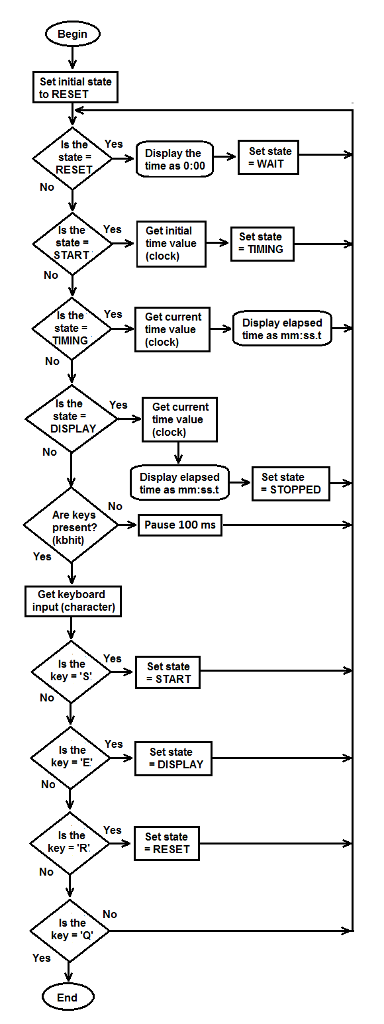
Begin Set initial state to RESET s the Yes Display the Set state state WAIT time as 0:00 RESET No s the Yes Get initial set state state time value TIMING START clock No s the Yes Get current state time value Display elapsed time as mm:ss t TIMING clock No s the Yes, Get current state time value DISPLAY clock No Display elapsed time as Set state STOPPED No Are keys Pause 100 ms present? (kbhit0 Yes Get keyboard input character Yes, s the Set state key START No Yes Is the Set state key DISPLAY No Yes Is the Set state key RESET No No Is the key a 'Q Yes End
Step by Step Solution
There are 3 Steps involved in it

Get step-by-step solutions from verified subject matter experts
 Study Help