







Question: Create a Sudoku board GUI in Java to simulate a game. Only include the following three on your java code: 1. Sudoku Board GUI 2.
Create a Sudoku board GUI in Java to simulate a game.
Only include the following three on your java code:
1. Sudoku Board GUI
2. 9 numbered buttons from 1 to 9
3. Button called CHECK
Add few numbers in the square boards of the Sudoku. The user will then fill up the rest of the square board that dont have a number by clicking a numbered button. The square board will then change to that number. The user will then click the button CHECK to see if there is no duplicates numbers in a row and column based on the Sudoku rule. If there is duplicate numbers then the color of the number will change to red. If there is no duplicate numbers then the color of the number remains in color black. Run the java code in Eclipse. The output must only show the Sudoku board GUI, the 9 buttons, the CHECK button, and the number change to color red when there is duplicate numbers. Do not include message dialog. Below is an example of the Sudoku that have a board, number 1 to 9 buttons, and the check button. The rest does not need to be added (Hint button, Clear button, Exit button , File, and Help).
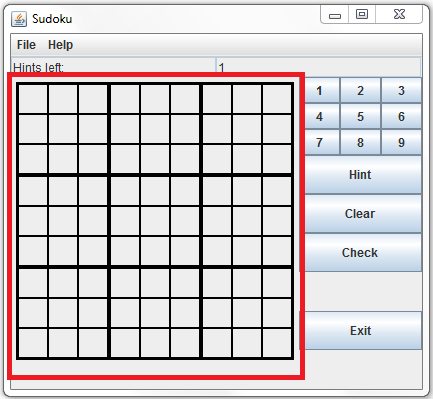
Sudoku File Help 4 5 6 7 9 Hint Clear Check Exit
Step by Step Solution
There are 3 Steps involved in it

Get step-by-step solutions from verified subject matter experts
 Study Help