







Question: create a visual studio project in c# Add a new form to the project named EmployeeDetails.cs. a. Drag and drop one DataGridView control to the
create a visual studio project in c#
Add a new form to the project named EmployeeDetails.cs. a. Drag and drop one DataGridView control to the form. b. Add fields to the Datagridview. c. To add fields right click on the datagridview ->Edit column->Add->Give Name, Heading and DataPropertyName. DataPropertyName should be same as the database column. Add all the fields required to display in datagridview-> click on ok d. Design the form as follows
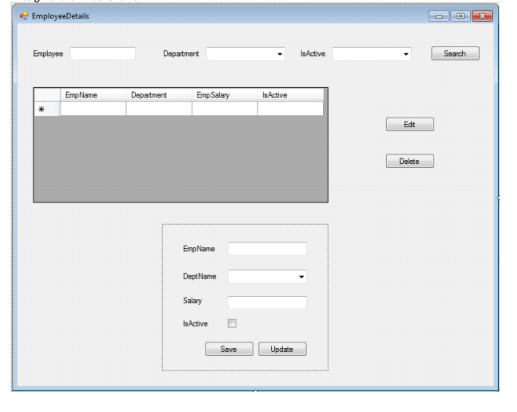
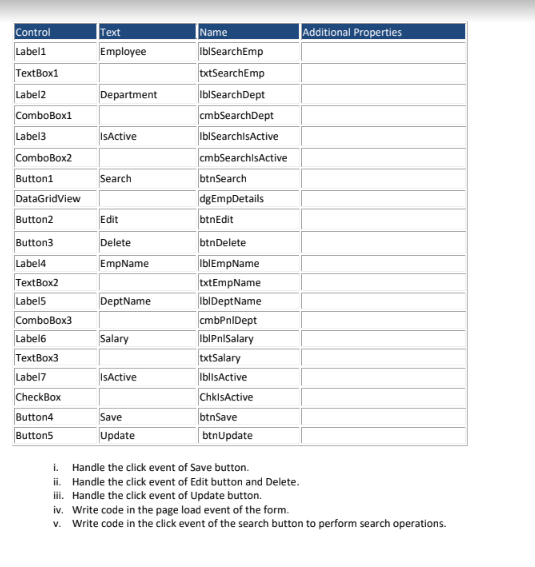
EmployeeDetails Employee Department la Active Search Emp Name Department EmpSelay IsActive Edit Delete Emplame Dept Name Salary Active Save Update Additional Properties Control Labeli Text Employee TextBox1 Label2 Department ComboBox1 Name IblSearchEmp txtSearchEmp IblSearchDept cmbSearchDept Ib SearchisActive cmbSearchisActive btnSearch dgEmpDetails Label3 IsActive ComboBox2 Button1 Search DataGridView Button2 Edit btnEdit Button3 Delete Label4 EmpName DeptName TextBox2 Labels ComboBox3 Label6 TextBox3 Label7 Salary btnDelete IblEmpName txtEmpName IbiDeptName cmbPnlDept lblPnSalary txtSalary IblisActive ChklsActive btnSave btnUpdate IsActive CheckBox Button4 Buttons Save Update 1. Handle the click event of Save button. ii. Handle the click event of Edit button and Delete. iii. Handle the click event of Update button. iv. Write code in the page load event of the form. v. Write code in the click event of the search button to perform search operations
Step by Step Solution
There are 3 Steps involved in it

Get step-by-step solutions from verified subject matter experts
 Study Help