







Question: Create an angular project with routing enabled and bootstrap 4.x installed. Attached are the used pictures. You may use them or use another pictures that
Create an angular project with routing enabled and bootstrap 4.x installed. Attached are the used pictures. You may use them or use another pictures that can be more suitable for the page design. The project must have the following components: The app component (default component) The header component The footer component The home component The new Donor component The search Donor component The ads Panel component And the following services: The DonorsData service The adsData service Use the command: ng generate service serviceName to auto generate a service (recommended) In this project we will handle with two objects: a donor object having the bellow data fields: o bloodgroup o address o email o additional info an ad object having the bellow data fields o title o body o link o linktext
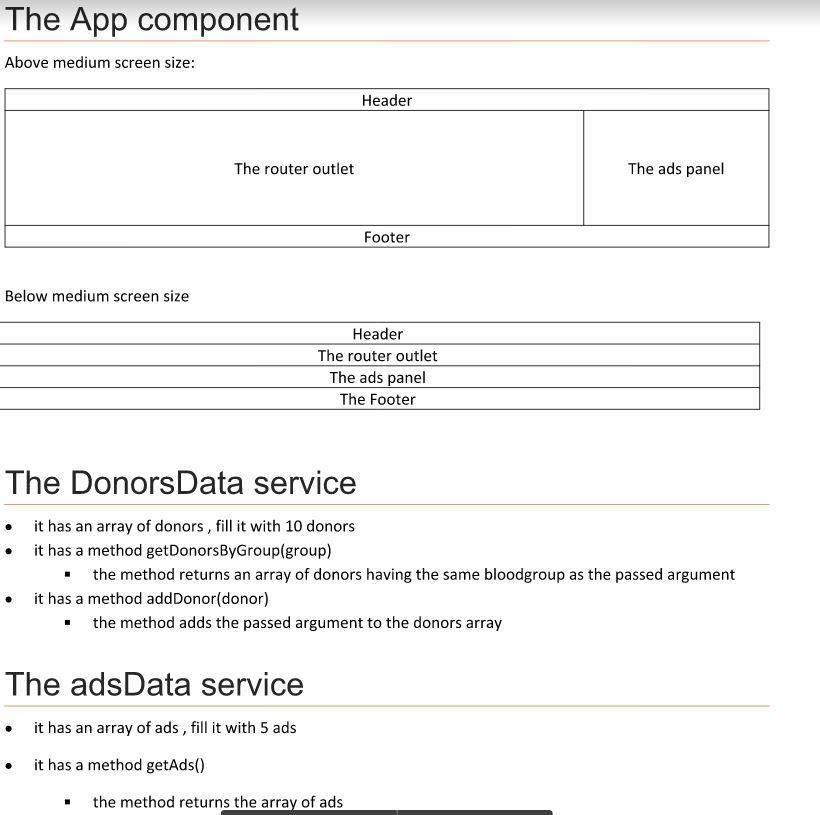
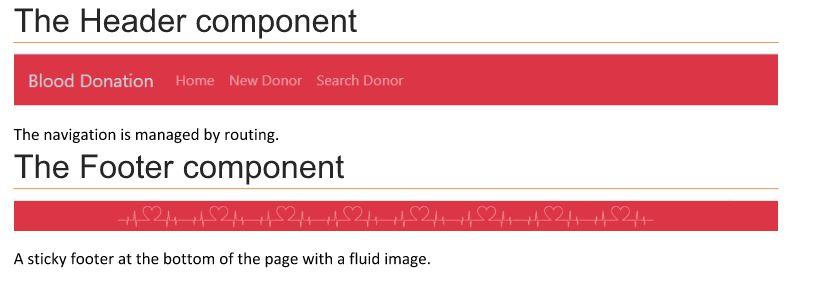
The App component Above medium screen size: Header The router outlet The ads panel Footer Below medium screen size Header The router outlet The ads panel The Footer The Donors Data service it has an array of donors, fill it with 10 donors it has a method getDonorsByGroup(group) . the method returns an array of donors having the same bloodgroup as the passed argument it has a method addDonor(donor) the method adds the passed argument to the donors array The adsData service it has an array of ads, fill it with 5 ads it has a method getAds() the method returns the array of ads The Header component Blood Donation Home New Donor Search Donor The navigation is managed by routing. The Footer component +4521452144452114482752141521242448244- $ A sticky footer at the bottom of the page with a fluid image
Step by Step Solution
There are 3 Steps involved in it

Get step-by-step solutions from verified subject matter experts
 Study Help