







Question: Create email address: Write a formula to create an email address in J8:J13 using the first name and last name of the consultant. Add a
Create email address: Write a formula to create an email address in J8:J13 using the first name and last name of the consultant. Add a "." between the first and last name. Add the "@" symbol after the last name. Finally use the Consultant_details table to obtain the email domain name by using the first letter of the first name and the last three letters of the last name to match the consultant ID. Bob Inaros email address in cell J8 should display as: Bob.Inaros@bbgroup.com (his Consultant ID is BROS). Jon Lannisters email address in cell J13 should display: Jon.Lannister@tychos.com (his Consultant ID is JTER). VLOOKUP, LEFT, RIGHT, CONCAT (or CONCATENATE) Define the name range H19:I24 asConsultant_details and use this in your VLOOKUP 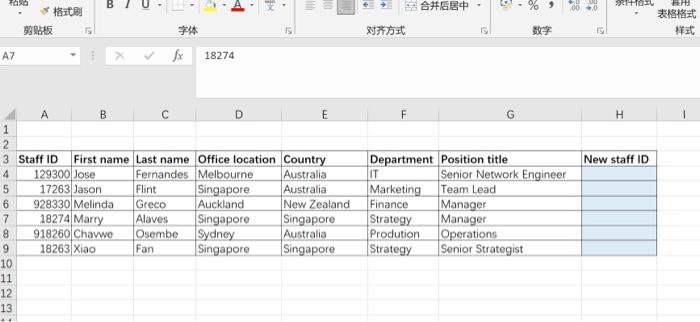
TA B . 9 000 SRO 15 15 AZ fx 18274 F H New staff ID A B C D E 1 2 3 Staff ID First name Last name Office location Country 4 129300 Jose Fernandes Melbourne Australia 5 17263 Jason Flint Singapore Australia 6 928330 Melinda Greco Auckland New Zealand 7 18274 Marry Alaves Singapore Singapore 8 918260 Chavwe Osembe Sydney Australia 9 18263 Xiao Fan Singapore Singapore 10 11 12 13 Department Position title IT Senior Network Engineer Marketing Team Lead Finance Manager Strategy Manager Prodution Operations Strategy Senior Strategist TA B . 9 000 SRO 15 15 AZ fx 18274 F H New staff ID A B C D E 1 2 3 Staff ID First name Last name Office location Country 4 129300 Jose Fernandes Melbourne Australia 5 17263 Jason Flint Singapore Australia 6 928330 Melinda Greco Auckland New Zealand 7 18274 Marry Alaves Singapore Singapore 8 918260 Chavwe Osembe Sydney Australia 9 18263 Xiao Fan Singapore Singapore 10 11 12 13 Department Position title IT Senior Network Engineer Marketing Team Lead Finance Manager Strategy Manager Prodution Operations Strategy Senior Strategist Step by Step Solution
There are 3 Steps involved in it
1 Expert Approved Answer
Step: 1 Unlock

Question Has Been Solved by an Expert!
Get step-by-step solutions from verified subject matter experts
Step: 2 Unlock
Step: 3 Unlock
 Study Help