







Question: Create the Company database found in your text, page 181 print and submit Script used to create the database The result of a Show Tables;
Create the Company database found in your text, page 181
print and submit
Script used to create the database
The result of a Show Tables; command
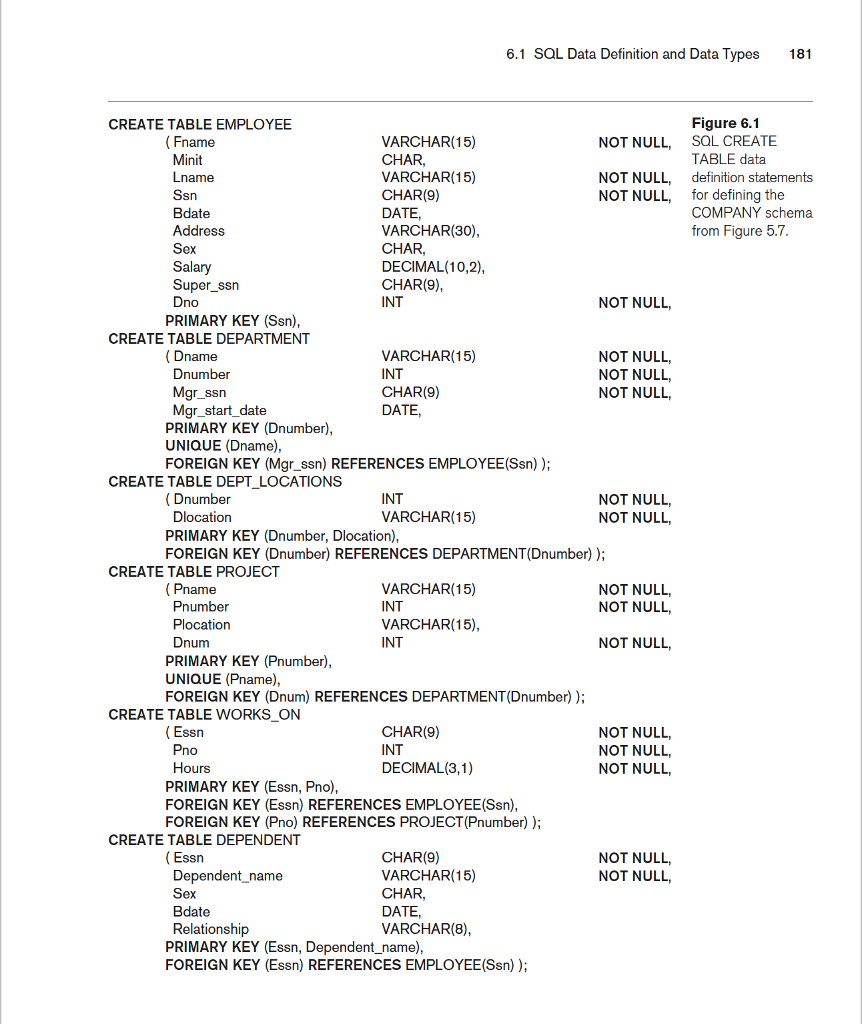
6.1 SQL Data Definition and Data Types 181 Figure 6.1 SQL CREATE TABLE data definition statements for defining the COMPANY schema from Figure 5.7 CREATE TABLE EMPLOYEE (Fname Minit Lname VARCHAR(15) CHAR, VARCHAR(15) CHAR(9) NOT NULL, NOT NULL, NOT NULL, sn Bdate Address Sex VARCHAR(30), CHAR, DECIMAL(10,2), CHAR(9), INT Super ssrn Dno NOT NULL, PRIMARY KEY (Ssn), CREATE TABLE DEPARTMENT VARCHAR(15) INT CHAR(9) DATE, NOT NULL, NOT NULL NOT NULL name Dnumber gr_ssn Mgr_start_date PRIMARY KEY (Dnumber) UNIQUE (Dname) FOREIGN KEY (Mgrssn) REFERENCES EMPLOYEE(Ssn)) CREATE TABLE DEPT LOCATIONS INT VARCHAR(15) NOT NULL, NOT NULL, Dnumber Dlocation PRIMARY KEY (Dnumber, Dlocation), FOREIGN KEY (Dnumber) REFERENCES DEPARTMENT(Dnumber)) CREATE TABLE PROJECT NOT NULL, NOT NULL Pname Pnumber Plocation Dnum VARCHAR(15) INT VARCHAR(15), INT NOT NULL, PRIMARY KEY (Pnumber), UNIQUE (Pname), FOREIGN KEY (Dnum) REFERENCES DEPARTMENT (Dnumber)) CREATE TABLE WORKS ON Essn Pno Hours CHAR(9) INT DECIMAL(3,1) NOT NULL, NOT NULL, NOT NULL, PRIMARY KEY (Essn, Pno), FOREIGN KEY (Essn) REFERENCES EMPLOYEE(Ssn), FOREIGN KEY (Pno) REFERENCES PROJECT (Pnumber)) CREATE TABLE DEPENDENT NOT NULL NOT NULL (Essn Dependent_name Sex Bdate Relationship CHAR(9) VARCHAR(15) CHAR, DATE VARCHAR(8) PRIMARY KEY (Essn, Dependent_name) FOREIGN KEY (Essn) REFERENCES EMPLOYEE(Ssn))
Step by Step Solution
There are 3 Steps involved in it

Get step-by-step solutions from verified subject matter experts
 Study Help