







Question: Create the following graphical user interface (GUI) using JavaFX. Please note there wl be NO FUNCTIONALITY in this GUI. It is ONLY the display. Nothing
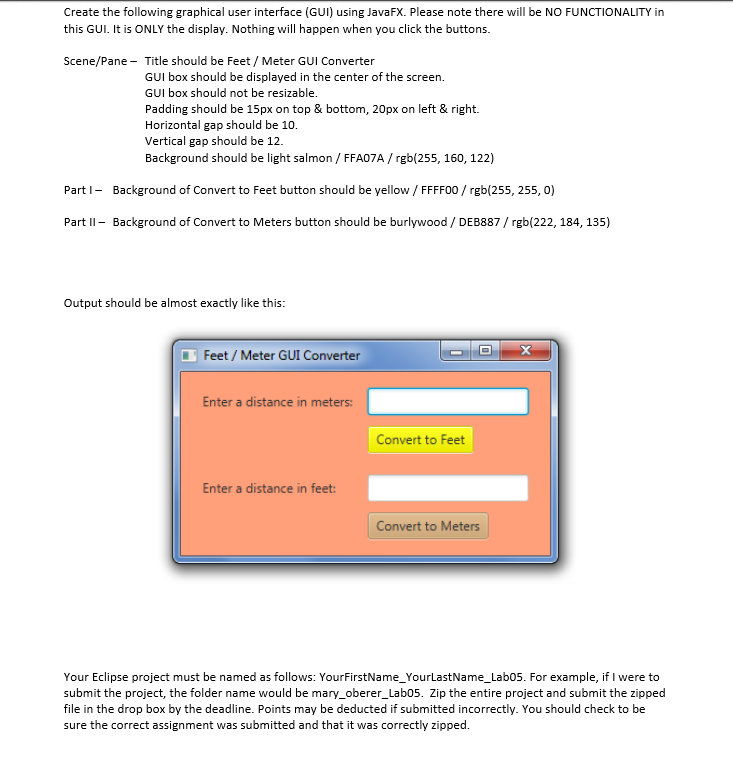
Create the following graphical user interface (GUI) using JavaFX. Please note there wl be NO FUNCTIONALITY in this GUI. It is ONLY the display. Nothing will happen when you click the buttons. Scene/Pane - Title should be Feet/ Meter GUI Converter GUI box should be displayed in the center of the screen GUI box should not be resizable. Padding should be 15px on top & bottom, 20px on left & right. Horizontal gap should be 10. Vertical gap should be 12 Background should be light salmon / FFA07A/rgb(255, 160, 122) PartI Background of Convert to Feet button should be yellow /FFFF00/rgb(255, 255, o) PartI Background of Convert to Meters button should be burlywood/ DEB887/ rgb(222, 184, 135) Output should be almost exactly like this: Feet/ Meter GUI Converter Enter a distance in meters: Convert to Feet Enter a distance in feet Convert to Meters Your Eclipse project must be named as follows: YourFirstName_YourLastName_Lab05. For example, if I were to submit the project, the folder name would be mary_oberer_Lab05. Zip the entire project and submit the zipped file in the drop box by the deadline. Points may be deducted if submitted incorrectly. You should check to be sure the correct assignment was submitted and that it was correctly zipped
Step by Step Solution
There are 3 Steps involved in it

Get step-by-step solutions from verified subject matter experts
 Study Help