







Question: Creating client and server connection with python Task: Implement the client and the simulation server for the following protocol in Python 3. Goal: TAP is
Creating client and server connection with python
Task: Implement the client and the simulation server for the following protocol in Python 3.
Goal: TAP is an application-layer Internet protocol that is designed to allow a remote user to check the temperature of the house as measured by the thermostat, and to set the desired temperature of the thermostat. TAP uses a client-server architecture in which the thermostat functions as the server. In the simulation, the server always sends the same value when asked for the temperature (72), and the server prints the new desired temperature when asked to set the desired temperature.
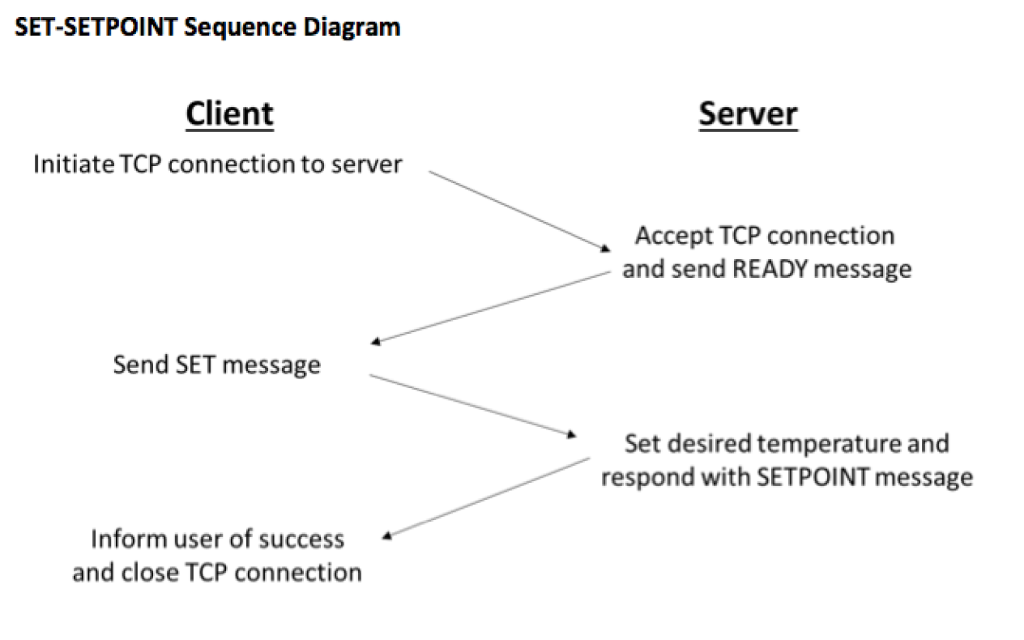
Narrative description: To check the temperature, a TAP client first establishes a TCP connection with the TAP server. Upon receiving the READY message from the server, the client then sends a CHECK message. The server responds with a TEMP message containing the current measured temperature (in the simulation, the server always responds with the value 72). Upon receiving the TEMP message, the client then displays the temperature to the user and closes the TCP connection. To set the temperature, the TAP client first establishes a TCP connection with the TAP server. Upon receiving the READY message from the server the client then sends a SET message containing the new desired temperature. The server responds with a SETPOINT message that contains the new desired temperature after it has been set. Upon receiving the SETPOINT message, the client then informs the user that the temperature has been set and closes the TCP connection.
Messages that can be sent by the Client: TAP 1.0 CHECK TAP 1.0 SET {temp}
Messages that can be sent by the Server: TAP 1.0 READY TAP 1.0 TEMP {temp} TAP 1.0 SETPOINT {temp}
In the SET, TEMP and SETPOINT messages, {temp} must be an two-digit ASCII sequence representing an integer between 35 and 99 that is to be interpreted as a temperature on the Fahrenheit scale.
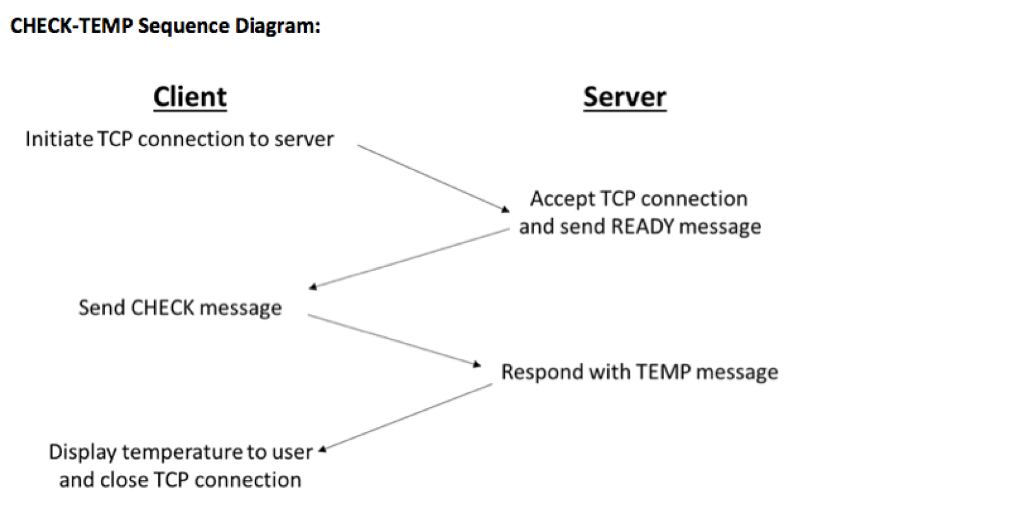
CHECK-TEMP Sequence Diagram: Client Server Initiate TCP connection to server Accept TCP connection and send READY message Send CHECK message Respond with TEMP message Display temperature to user and close TCP connection
Step by Step Solution
There are 3 Steps involved in it

Get step-by-step solutions from verified subject matter experts
 Study Help