







Question: Creating Employee Data Create an application that allows the user to enter the following employee data: First Name, Middle Name, Last Name, Employee Number, Department,
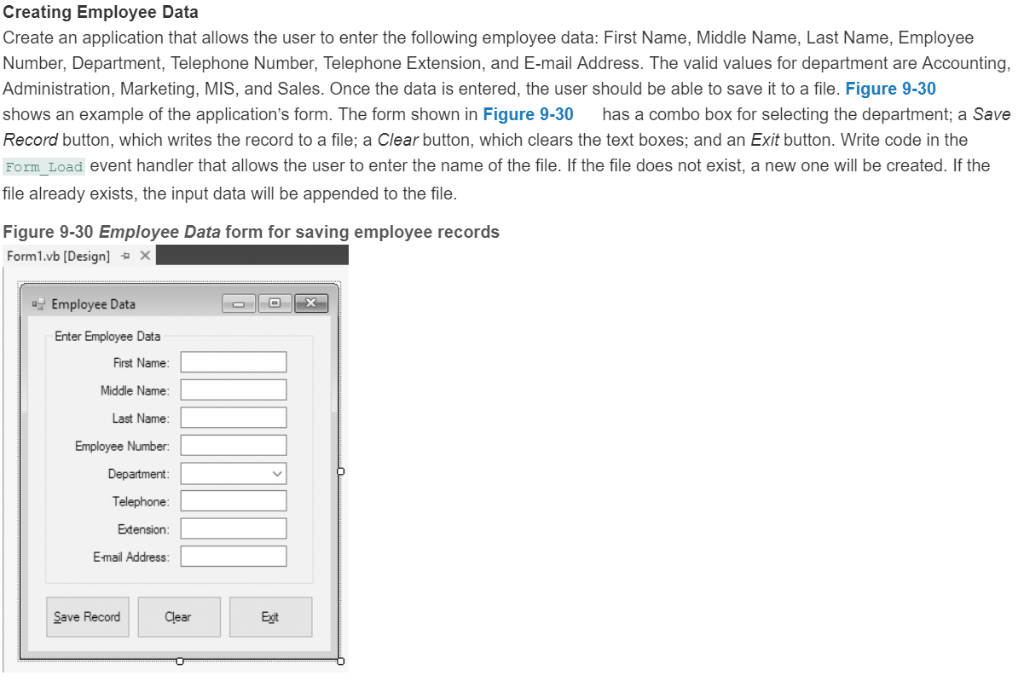
Creating Employee Data Create an application that allows the user to enter the following employee data: First Name, Middle Name, Last Name, Employee Number, Department, Telephone Number, Telephone Extension, and E-mail Address. The valid values for department are Accounting Administration, Marketing, MIS, and Sales. Once the data is entered, the user should be able to save it to a file. Figure 9-30 shows an example of the application's form. The form shown in Figure 9-30 has a combo box for selecting the department; a Save Record button, which writes the record to a file; a Clear button, which clears the text boxes; and an Exit button. Write code in the Form_Load event handler that allows the user to enter the name of the file. If the file does not exist, a new one will be created. If the file already exists, the input data will be appended to the file. Figure 9-30 Employee Data form for saving employee records Forml.vb [Design] Employee Data Enter Employee Data First Name Middle Name Last Name Employee Number Department: Telephone Extension Email Address Save Record Clear Egt
Step by Step Solution
There are 3 Steps involved in it

Get step-by-step solutions from verified subject matter experts
 Study Help