



Question: Creating the dipole Start with the trinket below. Run the code to see what it does, then read the code and answer th Which sphere
Creating the dipole
Start with the trinket below. Run the code to see what it does, then read the code and answer th
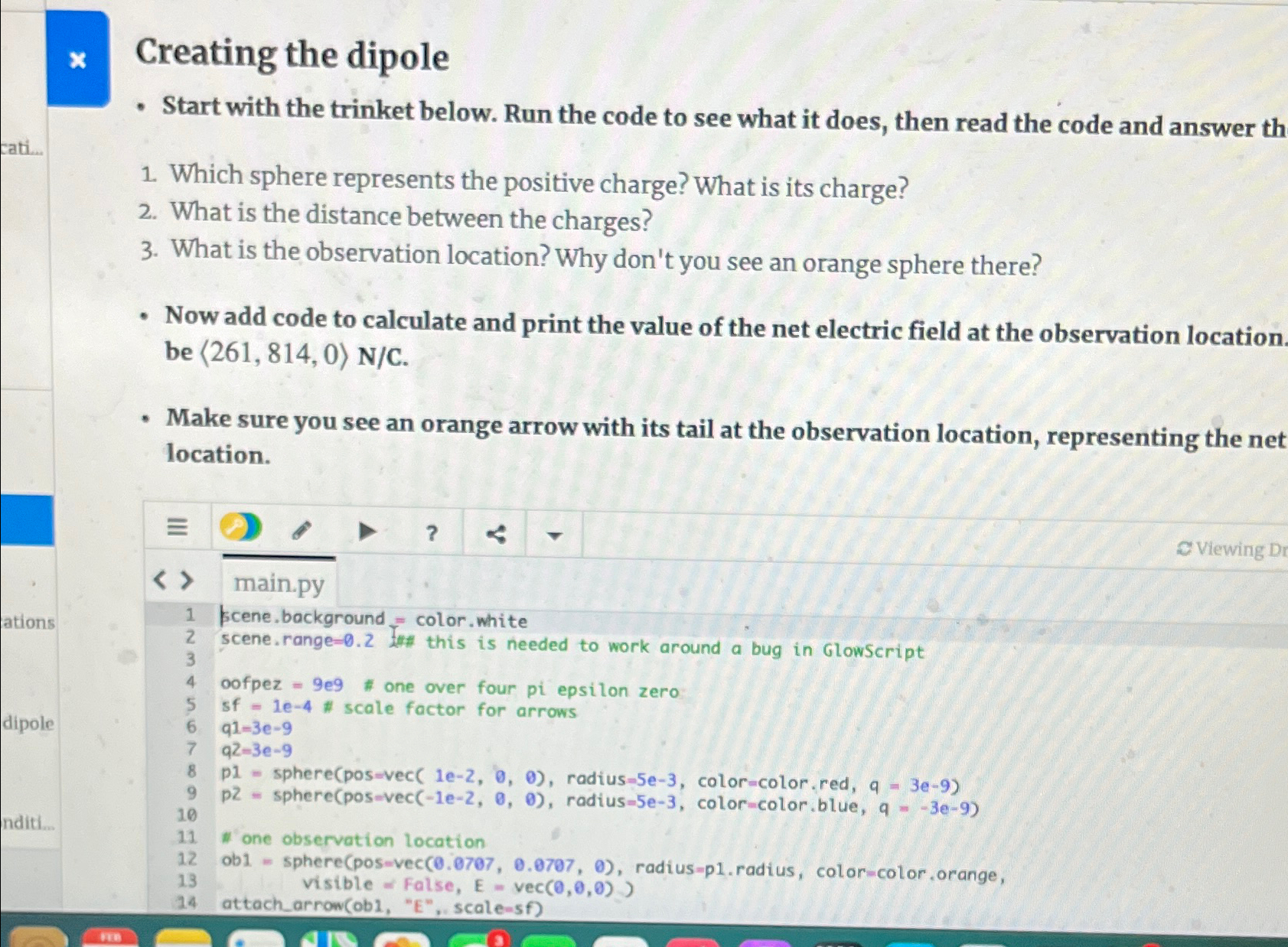
Which sphere represents the positive charge? What is its charge?
What is the distance between the charges?
What is the observation location? Why don't you see an orange sphere there?
Now add code to calculate and print the value of the net electric field at the observation location be ::
Make sure you see an orange arrow with its tail at the observation location, representing the net location.
Viewing
main.py
kcene, background color. white
scene. range Int this is needed to work around a bug in GlowScript
oofpez e # one over four pi epsilon zero
sf scale factor for arrows
q
q
p sphereposvec radius color color. red,
p sphereposvec radiuse colorcolor.blue,
'one observation location
ob sphereposvec radiusp radius, colorcolor orange,
visible False, vec
attacharrowobE scalesf
Step by Step Solution
There are 3 Steps involved in it
1 Expert Approved Answer
Step: 1 Unlock

Question Has Been Solved by an Expert!
Get step-by-step solutions from verified subject matter experts
Step: 2 Unlock
Step: 3 Unlock