







Question: cse lab3 genchesse lab Part 1: Fix Error.java Fix the code so the program will run correctly for MAXCHEESE values of 0 to 20 (inclusive).

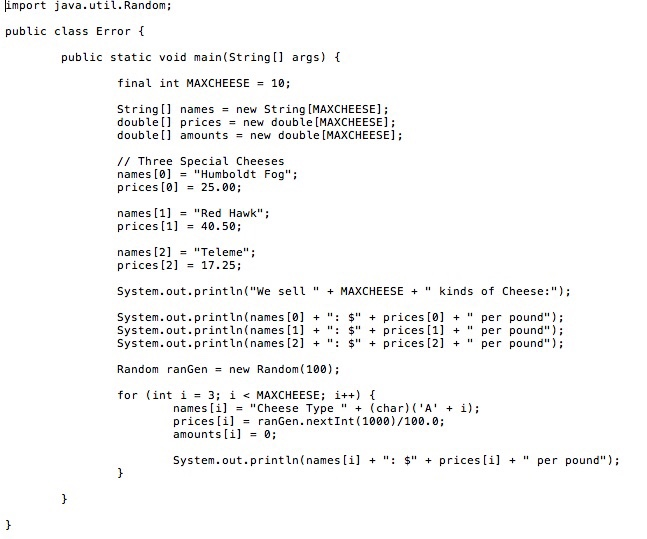
Part 1: Fix Error.java Fix the code so the program will run correctly for MAXCHEESE values of 0 to 20 (inclusive). Note that the value of MAXCHEESE is set by changing the value in the code itself. If you are not sure of how it should work then look at the Sample Runs of the next part. This part handles the beginning where it lists all the cheese types available and their prices. Note: it is a very simple fix that needs to be added to all the statements that have an array access. import java.util. Random; public class Error { public static void main(String[args) { final int MAXCHEESE = 10; String [] names = new String [MAXCHEESE); doublell prices = new double (MAXCHEESE) ; double amounts = new double (MAXCHEESE); // Three Special Cheeses names [0] = "Humboldt Fog"; prices [0] = 25.00; names [1] = "Red Hawk"; prices (1) = 40.50; names [2] = "Teleme"; prices [2] = 17.25; System.out.println("We sell " + MAXCHEESE + " kinds of Cheese:"); System.out.println(names [0] + ": " + prices [0] + " per pound"); System.out.println(names [1] + ": $" + prices [1] + " per pound"); System.out.println(names [2] + ": $" + prices [2] + " per pound" ); Random ranGen = new Random (100); for (int i = 3; i
Step by Step Solution
There are 3 Steps involved in it

Get step-by-step solutions from verified subject matter experts
 Study Help