







Question: C-Sharp University needs you to create a form that will add code that parses a students email address and formats the city, state, and zip
C-Sharp University needs you to create a form that will add code that parses a students email address and formats the city, state, and zip code portion of students address.
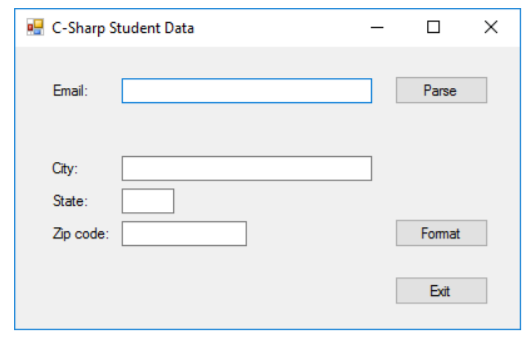
Open the project and add code to parse an email address
1. Start Visual Studio.
2. Click the Create Project hyperlink or use the File-New Project menu option.
3. In the New Project dialog box type a name for the projectname the project Lab9-SectionTime-YourLastName-YourFirstName
4. Change the forms File Name property from Form1.vb to a new name Lab9.cs
5. Change the title of the form as shown above.
6. Add labels, text boxes, and buttons to the default form and set the properties of the form and its controls so they appear as shown above. When the user presses the Esc key, the Click event of the Exit button should fire.
7. Add code to parse the email address into two parts when the user clicks the Parse button: the user name before the @ sign and the domain name after the @ sign. Create an email variable to store the email address from the textbox and trim it to ensure there are no leading characters. (string email = txtEmail.Text.Trim())
Be to check that the email contains an @ sign before you parse it, and display an error message if it doesnt. This will require you to create a variable and assign the email.IndexOf(@)+1 to ensure the variable used for the email includes an @ sign. (int domainIndex = email.IndexOf("@") + 1) Then use an If to test the domanIndex is greater than 0.
If greater than 0 then use the Substring method to assign a username variable to the portion of the email before the @ sign ( string username = email.Substring(0, variableIndex - 1)) and the Substring method to assign a domain name variable as the portion of the email after the @ sign (string doman = email.Substring(variableIndex)).
Show a message box containing the information as shown below
If the value is less than 0 show a message box that lets user know the email did not contain an @ sign and make the email textbox the focus.
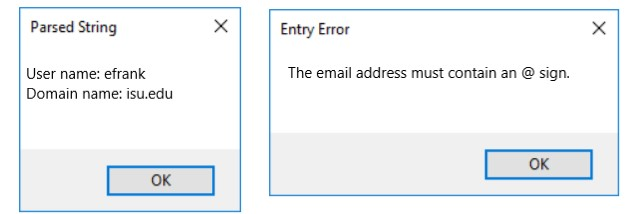
8. Test the application with both valid and invalid email addresses to be sure it works correctly. Add code to format an address
9. Add code to format the city, state, and zip code when the user clicks the Format button. Also include the current date and time.
Create string variables that contains the city, state, and zip code and assign them to each textbox. Use the Trim method on city state and zip and the ToUpper method on the state. ( string city, state zip)
Create a DateTime variable and assign it to the current date and time using the Now function.
Create an integer variable to hold the length of the city. (int cityLength = city.Length)
Create a string variable to hold the city state and zip concatenated together. String cityStateZip = city + state + zip
A comma after the city length needs to be inserted and then a space between the state and the zip code which is the 4 position after the city length. (cityStateZip = cityStateZip.Insert(cityLength, ", ")) and (cityStateZip = cityStateZip.Insert(cityLength + 4, " ")
You can assume that the user enters appropriate data in each text box. Display the results in a message box like the second one shown below. Put the date and time on a separate line.
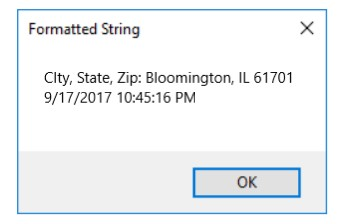
10. Test the application to be sure it formats the city, state, and zip code correctly.
C-Sharp Student Data Email Parse City: State: Zip code: Format Exdt
Step by Step Solution
There are 3 Steps involved in it

Get step-by-step solutions from verified subject matter experts
 Study Help