



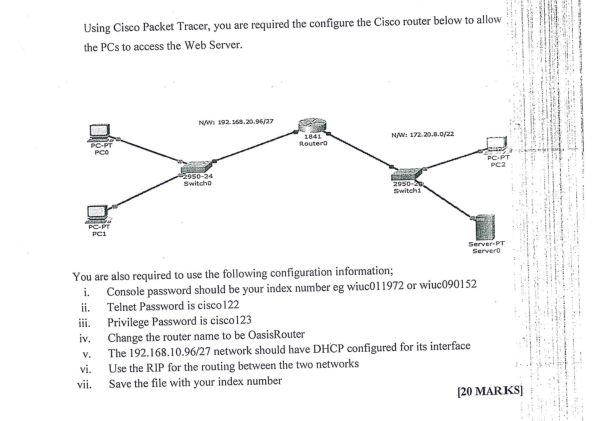
Question: DATA COMMUNICATIONS AND NETWORKS Using Cisco Packet Tracer, you are required the configure the Cisco router below to allow the PCs to access the Web
 DATA COMMUNICATIONS AND NETWORKS
Using Cisco Packet Tracer, you are required the configure the Cisco router below to allow the PCs to access the Web Server. NW 192.168.20.96/27 1841 Router N/W: 172.20.0.0/22 PC-PT PCO PC PT PC2 Switch 2950-2 Switch Server PT Server You are also required to use the following configuration information; i. Console password should be your index number eg wiuc011972 or wiuc090152 ii. Telnet Password is cisco122 iii. Privilege Password is cisco123 iv. Change the router name to be OasisRouter The 192.168.10.96/27 network should have DHCP configured for its interface vi. Use the RIP for the routing between the two networks vii. Save the file with your index number [20 MARKS v. Using Cisco Packet Tracer, you are required the configure the Cisco router below to allow the PCs to access the Web Server. NW 192.168.20.96/27 1841 Router N/W: 172.20.0.0/22 PC-PT PCO PC PT PC2 Switch 2950-2 Switch Server PT Server You are also required to use the following configuration information; i. Console password should be your index number eg wiuc011972 or wiuc090152 ii. Telnet Password is cisco122 iii. Privilege Password is cisco123 iv. Change the router name to be OasisRouter The 192.168.10.96/27 network should have DHCP configured for its interface vi. Use the RIP for the routing between the two networks vii. Save the file with your index number [20 MARKS v
Step by Step Solution
There are 3 Steps involved in it

Get step-by-step solutions from verified subject matter experts