







Question: DB2 Compile C program with Embedded SQL in Windows 10 command (DB2 CLP) How to run from windows 10 cmd or DB2 CLP without using
DB2 Compile C program with Embedded SQL in Windows 10 command (DB2 CLP)
How to run from windows 10 cmd or DB2 CLP without using MicroSoft Visual Studio IDE ??????? How do I link my sqc file to my db2 ???????
When I run, I got an error
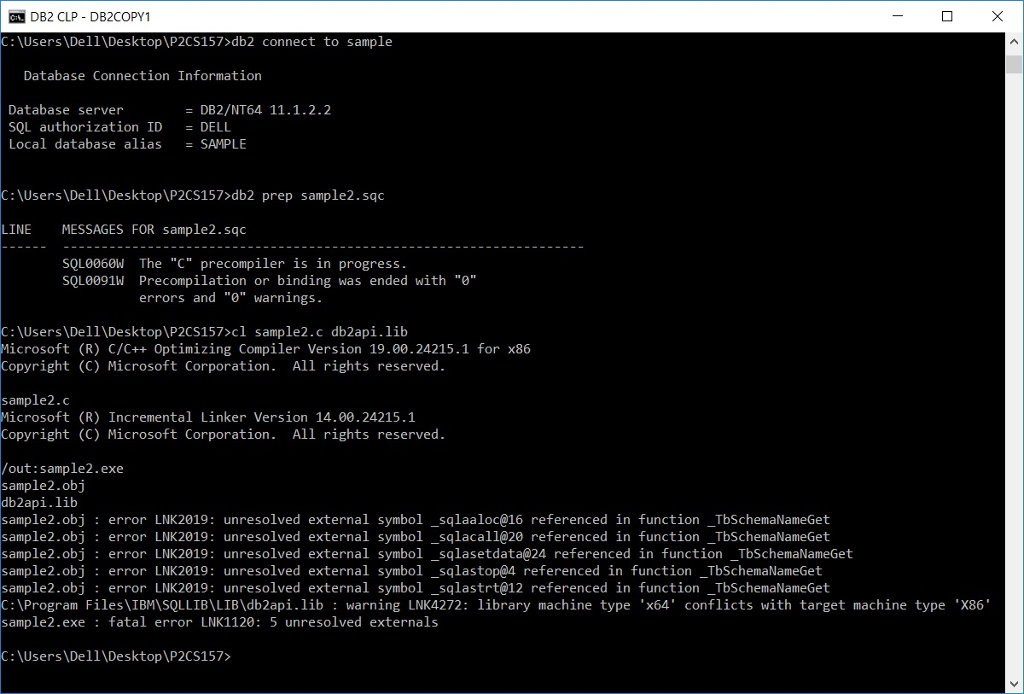
INSTRUCTION GIVEN:
For Windows local DB2 installation (Note that you have to customize your PATH)
rem *** NOTE ***
rem 1. You must run this in a DB2 Administrator Command Window.
rem 2. You must have compiler environment variables set. If not, then you must first run a batch file like "c:\vs2003\common7\tools\vsvars32.bat" to set up compiler vars.
db2 connect to sample
db2 prep sample2.sqc
rem Call C compiler
cl sample2.c db2api.lib
db2 terminate
rem To execute sample2.exe, "sample2 sample"
/*GIVEN sample2.sqc */
/**************************************************************************** ** (c) Copyright IBM Corp. 2007 All rights reserved. ** ** The following sample of source code ("Sample") is owned by International ** Business Machines Corporation or one of its subsidiaries ("IBM") and is ** copyrighted and licensed, not sold. You may use, copy, modify, and ** distribute the Sample in any form without payment to IBM, for the purpose of ** assisting you in the development of your applications. ** ** The Sample code is provided to you on an "AS IS" basis, without warranty of ** any kind. IBM HEREBY EXPRESSLY DISCLAIMS ALL WARRANTIES, EITHER EXPRESS OR ** IMPLIED, INCLUDING, BUT NOT LIMITED TO, THE IMPLIED WARRANTIES OF ** MERCHANTABILITY AND FITNESS FOR A PARTICULAR PURPOSE. Some jurisdictions do ** not allow for the exclusion or limitation of implied warranties, so the above ** limitations or exclusions may not apply to you. IBM shall not be liable for ** any damages you suffer as a result of using, copying, modifying or ** distributing the Sample, even if IBM has been advised of the possibility of ** such damages. ***************************************************************************** ** ** SOURCE FILE NAME: tbinfo.sqc ** ** SAMPLE: How to get information at the table level ** ** SQL STATEMENTS USED: ** SELECT ** DECLARE CURSOR ** OPEN ** FETCH ** CLOSE ** ** OUTPUT FILE: tbinfo.out (available in the online documentation) ***************************************************************************** ** ** For more information on the sample programs, see the README file. ** ** For information on developing C applications, see the Application ** Development Guide. ** ** For information on using SQL statements, see the SQL Reference. ** ** For the latest information on programming, building, and running DB2 ** applications, visit the DB2 application development website: ** http://www.software.ibm.com/data/db2/udb/ad ****************************************************************************/
#include
//#include
// #include "utilemb.h"
int TbSchemaNameGet(void); int TbColumnInfoGet(void);
EXEC SQL BEGIN DECLARE SECTION; char tableName[128]; char schemaName[128]; char columnName[20]; char dataType[14]; sqlint32 dataLength; short dataScale; char dbAlias[15]; char user[129]; char pswd[15]; EXEC SQL END DECLARE SECTION;
int main(int argc, char *argv[]) { int rc = 0; struct sqlca sqlca;
/* check the command line arguments */ if (argc
printf(" THIS SAMPLE SHOWS HOW TO GET INFORMATION AT THE TABLE LEVEL. ");
/* connect to the database */ printf(" Connecting to '%s' database... ", dbAlias); /* EXEC SQL CONNECT TO :dbAlias USER :user USING :pswd; */
EXEC SQL CONNECT TO :dbAlias; printf(" Connected to '%s' database. ", dbAlias);
strcpy(tableName, "EMPLOYEE");
rc = TbSchemaNameGet(); rc = TbColumnInfoGet();
/* disconnect from the database */ EXEC SQL CONNECT RESET; } return 0; } /* end main */
int TbSchemaNameGet(void) { struct sqlca sqlca;
printf(" -----------------------------------------------------------"); printf(" USE THE SQL STATEMENT: "); printf(" SELECT INTO "); printf("TO GET A TABLE SCHEMA NAME. ");
/* get the table schema name */ printf(" Execute the statement "); printf(" SELECT tabschema INTO :schemaName "); printf(" FROM syscat.tables "); printf(" WHERE tabname = :tableName "); printf(" for "); printf(" tableName = '%s'. ", tableName);
EXEC SQL SELECT tabschema INTO :schemaName FROM syscat.tables WHERE tabname = :tableName; /* EMB_SQL_CHECK("Table schema name -- Get"); */
/* get rid of spaces from the end of schemaName */ strtok(schemaName, " ");
printf(" Table schema name is: %s ", schemaName);
return 0; } /* TbSchemaNameGet */
int TbColumnInfoGet(void) { struct sqlca sqlca;
printf(" -----------------------------------------------------------"); printf(" USE THE SQL STATEMENTS: "); printf(" DECLARE CURSOR "); printf(" OPEN "); printf(" FETCH "); printf(" CLOSE "); printf("TO GET TABLE COLUMN INFO. ");
/* get info for table columns */ printf(" Get info for '%s.%s' table columns: ", schemaName, tableName); printf(" column name data type data size "); printf(" -------------------- -------------- ---------- ");
EXEC SQL DECLARE c1 CURSOR FOR SELECT colname, typename, length, scale FROM syscat.columns WHERE tabschema = :schemaName AND tabname = :tableName;
EXEC SQL OPEN c1; /* EMB_SQL_CHECK("Cursor -- Open"); */
EXEC SQL FETCH c1 INTO :columnName, :dataType, :dataLength, :dataScale; /* EMB_SQL_CHECK("Cursor -- Fetch"); */
if (sqlca.sqlcode == 100) { printf(" Data not found. "); }
while (sqlca.sqlcode != 100) { printf(" %-20.20s %-14.14s %d", columnName, dataType, dataLength); if (dataScale != 0) { printf(",%d ", dataScale); } else { printf(" "); }
EXEC SQL FETCH c1 INTO :columnName, :dataType, :dataLength, :dataScale; /* EMB_SQL_CHECK("Cursor -- Fetch"); */ }
EXEC SQL CLOSE c1; /* EMB_SQL_CHECK("Cursor -- Close"); */
return 0; } /* TbColumnInfoGet */
DB2 CLP - DB2COPY1 C: \Users\Del1 Desktop\P2CS157>db2 connect to sample Database Connection Information DB2/NT64 11.1.2.2 Database server SQL authorization ID = DELL Local database alias SAMPLE C:\Users \Dell\Desktop\P2CS157>db2 prep sample2.sqc LINE MESSAGES FOR sample2.sqo SQL0060W The "C" precompiler is in progress. SQL0091W Precompilation or binding was ended with "e" errors and"0" warnings. C: \Users \Dell\Desktop\P2CS157>cl sample2.c db2api.lib Microsoft (R) C/C++ Optimizing Compiler Version 19.00.24215.1 for x86 Copyright (C) Microsoft Corporation. All rights reserved sample2.c Microsoft (R) Incremental Linker Version 14.00.24215.1 Copyright (C) Microsoft Corporation. All rights reserved out:sample2.exe sample2.obj db2api.lib sample2.obj: error LNK2019: unresolved external symbol _sqlaaloc@16 referenced in function_TbSchemaNameGet sample2.obj error LNK2019: unresolved external symbol _sqlacall@20 referenced in function_TbSchemaNameGet sample2.obj error LNK2019: unresolved external symbol_sqlasetdata@24 referenced in function _TbSchemaNameGet sample2.obj: error LNK2019: unresolved external symbol _sqlastop@4 referenced in function _TbSchemaNameGet sample2.obj: error LNK2019: unresolved external symbol _sqlastrt@12 referenced in function_TbSchemaNameGet C: Program Files\IBMISQLLIB\LIB\db2api.lib warning LNK4272: library machine type 'x64' conflicts with target machine type 'X86" sample2.exe fatal error LNK1120: 5 unresolved externals C:\Users\Dell\Desktop\P2CS157> DB2 CLP - DB2COPY1 C: \Users\Del1 Desktop\P2CS157>db2 connect to sample Database Connection Information DB2/NT64 11.1.2.2 Database server SQL authorization ID = DELL Local database alias SAMPLE C:\Users \Dell\Desktop\P2CS157>db2 prep sample2.sqc LINE MESSAGES FOR sample2.sqo SQL0060W The "C" precompiler is in progress. SQL0091W Precompilation or binding was ended with "e" errors and"0" warnings. C: \Users \Dell\Desktop\P2CS157>cl sample2.c db2api.lib Microsoft (R) C/C++ Optimizing Compiler Version 19.00.24215.1 for x86 Copyright (C) Microsoft Corporation. All rights reserved sample2.c Microsoft (R) Incremental Linker Version 14.00.24215.1 Copyright (C) Microsoft Corporation. All rights reserved out:sample2.exe sample2.obj db2api.lib sample2.obj: error LNK2019: unresolved external symbol _sqlaaloc@16 referenced in function_TbSchemaNameGet sample2.obj error LNK2019: unresolved external symbol _sqlacall@20 referenced in function_TbSchemaNameGet sample2.obj error LNK2019: unresolved external symbol_sqlasetdata@24 referenced in function _TbSchemaNameGet sample2.obj: error LNK2019: unresolved external symbol _sqlastop@4 referenced in function _TbSchemaNameGet sample2.obj: error LNK2019: unresolved external symbol _sqlastrt@12 referenced in function_TbSchemaNameGet C: Program Files\IBMISQLLIB\LIB\db2api.lib warning LNK4272: library machine type 'x64' conflicts with target machine type 'X86" sample2.exe fatal error LNK1120: 5 unresolved externals C:\Users\Dell\Desktop\P2CS157>
Step by Step Solution
There are 3 Steps involved in it

Get step-by-step solutions from verified subject matter experts
 Study Help