







Question: Develop a MATLAB function called Forces, which has five input arguments: the magnitude and angle of Force 1 , the magnitude and angle of Force
Develop a MATLAB function called Forces, which has five input arguments: the magnitude
and angle of Force the magnitude and angle of Force and units for the angles degrees or
radians The function should first check for valid inputs. The magnitudes must be positive and
the units must be 'degrees' or 'radians' also could use D or R If any of the inputs are
invalid, the function should print a message to the user and terminate without returning any
values. If the inputs are valid, the function should compute the resultant force and return two
output arguments: the magnitude and angle of the resultant force. The angle should be in the
same units that the two forces were originally in
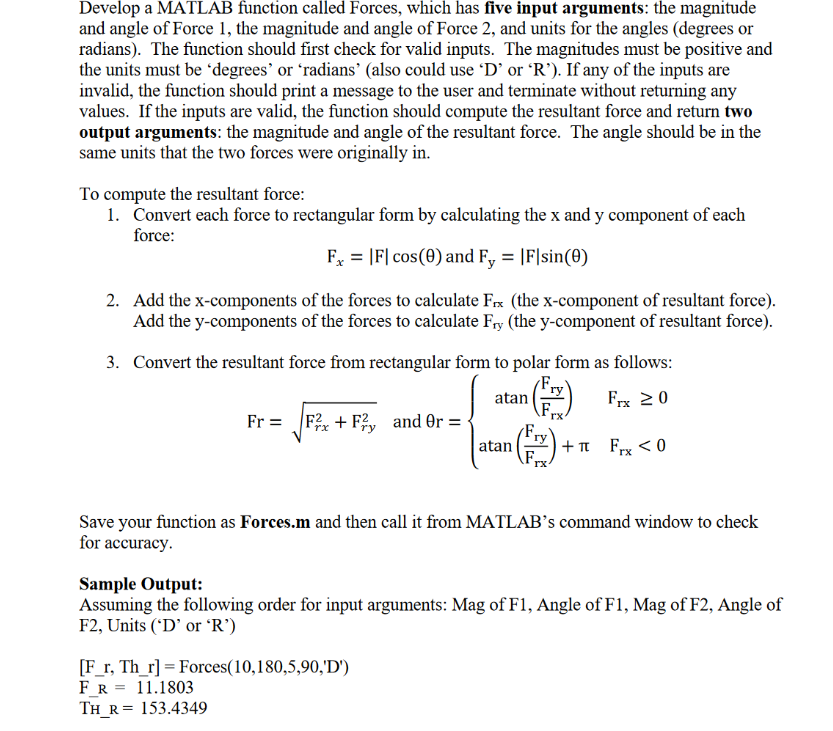
To compute the resultant force:
Convert each force to rectangular form by calculating the and component of each
force:
and
Add the x components of the forces to calculate the x component of resultant force
Add the y components of the forces to calculate the y component of resultant force
Convert the resultant force from rectangular form to polar form as follows:
and
Save your function as Forces.m and then call it from MATLAB's command window to check
for accuracy.
Sample Output:
Assuming the following order for input arguments: Mag of F Angle of F Mag of F Angle of
F Units D or R
Forces
Step by Step Solution
There are 3 Steps involved in it
1 Expert Approved Answer
Step: 1 Unlock

Question Has Been Solved by an Expert!
Get step-by-step solutions from verified subject matter experts
Step: 2 Unlock
Step: 3 Unlock
 Study Help