







Question: difference between NAS and SAN 4. The Configure File and Share Access part of the assignment showed you that share permissions and NTFS permissions work

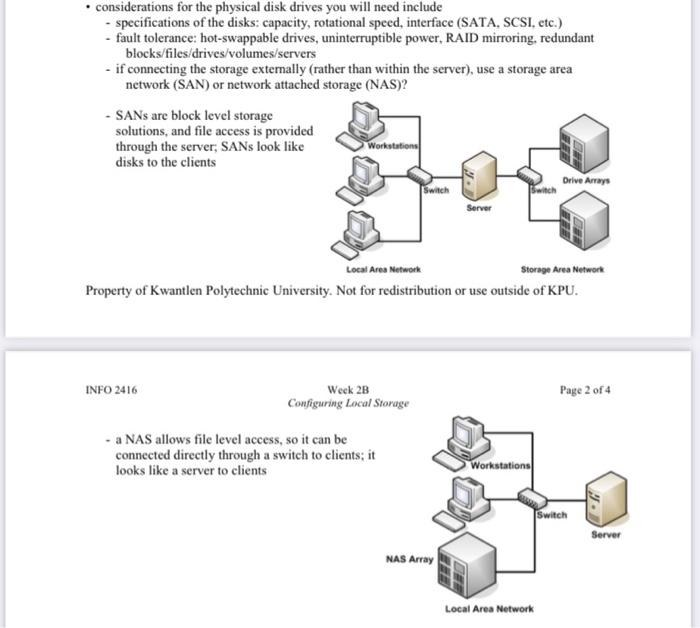
4. The Configure File and Share Access part of the assignment showed you that share permissions and NTFS permissions work differently. Describe: a. How to access share permissions from a folder's properties as accessed from the Windows desktop; b. How to access share permissions from a share listed in the file and Storage Services link in Server Manager, c. How to access NTFS permissions from a folder's properties as accessed from the Windows desktop: How to access NTFS permissions from a share listed in the File and Storage Services link in Server Manager. d. considerations for the physical disk drives you will need include - specifications of the disks: capacity, rotational speed, interface (SATA, SCSI, etc.) - fault tolerance: hot-swappable drives, uninterruptible power, RAID mirroring, redundant blocks/files/drives/volumes/servers - if connecting the storage externally (rather than within the server), use a storage area network (SAN) or network attached storage (NAS)? - SANs are block level storage solutions, and file access is provided through the server; SANs look like Workstations disks to the clients Drive Array Server Local Area Network Storage Area Network Property of Kwantlen Polytechnic University. Not for redistribution or use outside of KPU. INFO 2416 Week 2B Configuring Local Storage Page 2 of 4 - a NAS allows file level access, so it can be connected directly through a switch to clients, it looks like a server to clients Workstations Switch Server NAS Array Local Area Network
Step by Step Solution
There are 3 Steps involved in it
Difference Between NAS and SAN 1 Network Attached Storage NAS Type of Storage NAS is a filelevel storage solution This means that data is accessed through file systems such as NFS or SMB and the stora... View full answer

Get step-by-step solutions from verified subject matter experts
 Study Help