







Question: Directions: a. Format Column C for Fraction. Set Type to Up to two digits. b. Click on Cell C4. c. Key in the formula to
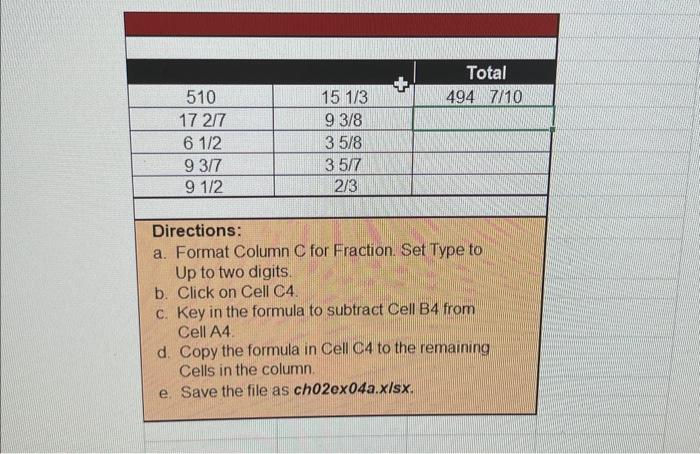
Directions: a. Format Column C for Fraction. Set Type to Up to two digits. b. Click on Cell C4. c. Key in the formula to subtract Cell B4 from Cell A4. d. Copy the formula in Cell C4 to the remaining Cells in the column. e. Save the file as ch02ex04a.x/sx
Step by Step Solution
There are 3 Steps involved in it
1 Expert Approved Answer
Step: 1 Unlock

Question Has Been Solved by an Expert!
Get step-by-step solutions from verified subject matter experts
Step: 2 Unlock
Step: 3 Unlock
 Study Help