







Question: Directions:- Use SQL Server 2017 . See the images below and under TAL distributors write queries to perform steps 1 and 2 and 3. In
Directions:-
Use SQL Server 2017.
See the images below and under TAL distributors write queries to perform steps 1 and 2 and 3. In Step 1 - name your table as Sales_Rep_Lastname. (The Last name in the table name is your Lastname). Write all three of the above steps in one query window and save that query window as Lastname_Chapter3_Project. Turn in that query file.
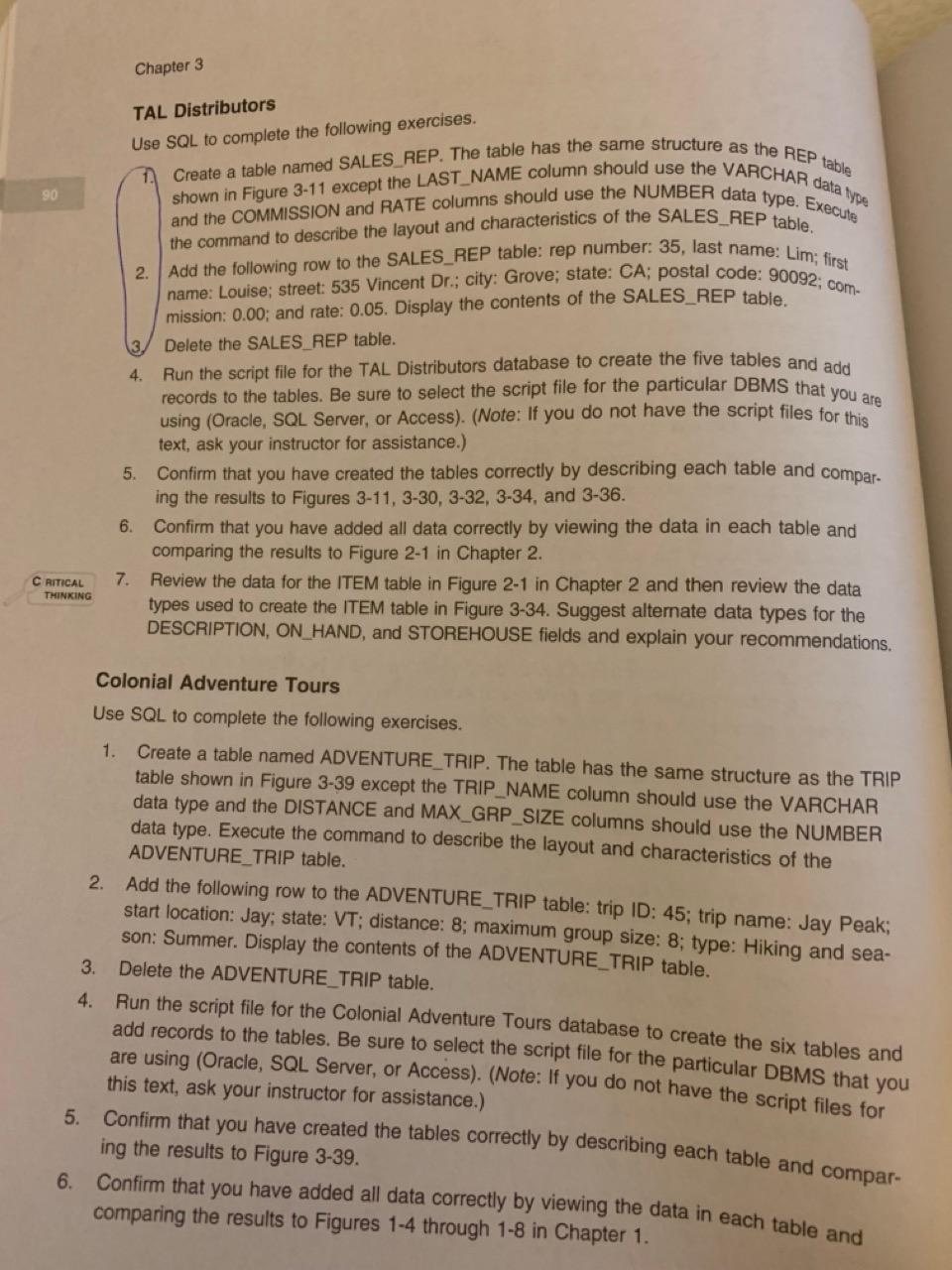
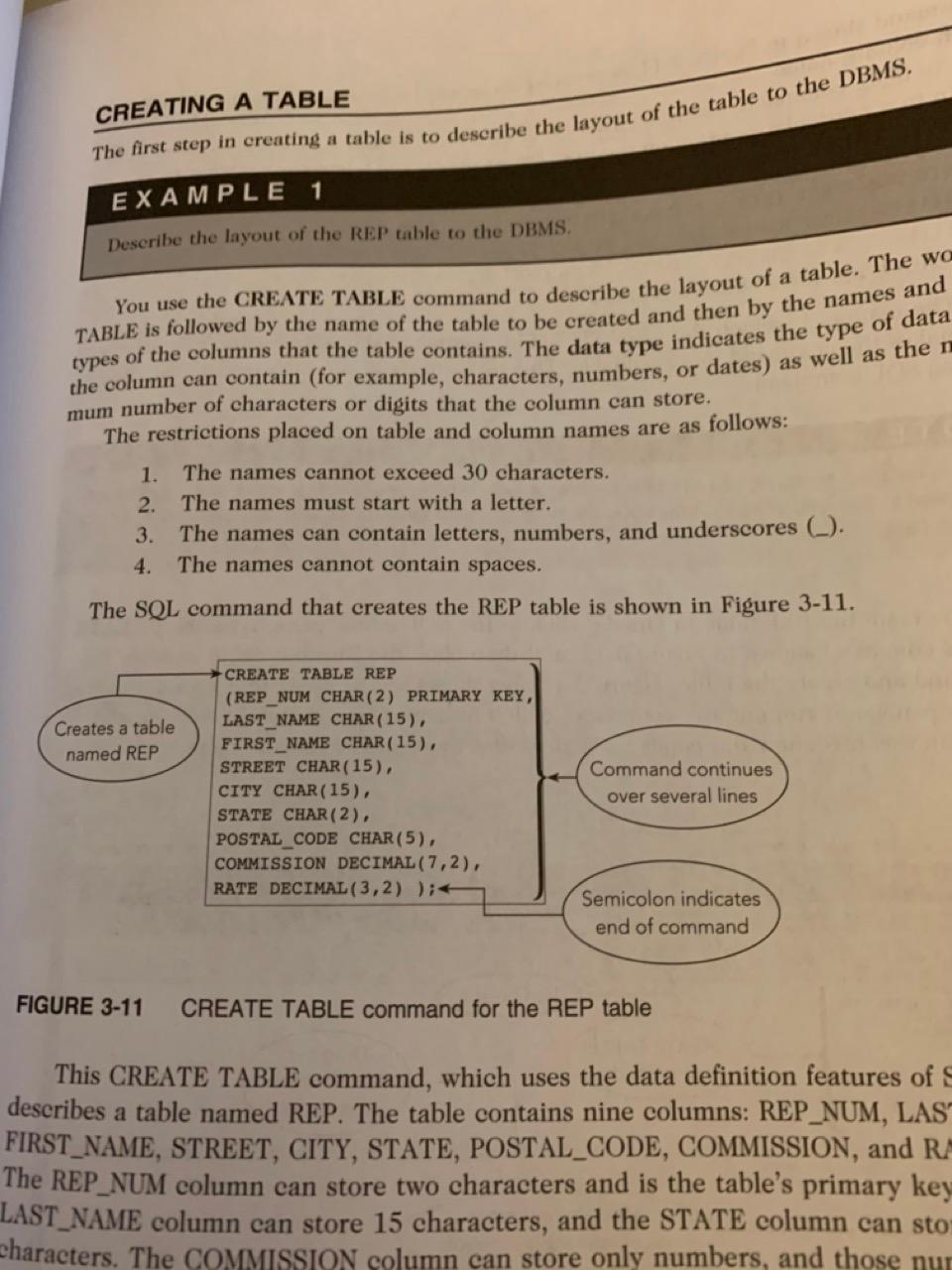
Chapter 3 TAL Distributors Use SQL to complete the following exercises. 1. Create a table named SALES_REP. The table has the same structure as the REP table shown in Figure 3-11 except the LAST_NAME column should use the VARCHAR data type and the COMMISSION and RATE columns should use the NUMBER data type. Execule the command to describe the layout and characteristics of the SALES_REP table. 2. Add the following row to the SALES_REP table: rep number: 35, last name: Lim; first name: Louise; street: 535 Vincent Dr.; city: Grove; state: CA; postal code: 90092 ; commission: 0.00; and rate: 0.05 . Display the contents of the SALES_REP table. (3. Delete the SALES REP table. 4. Run the script file for the TAL Distributors database to create the five tables and add records to the tables. Be sure to select the script file for the particular DBMS that you are using (Oracle, SQL Server, or Access). (Note: If you do not have the script files for this text, ask your instructor for assistance.) 5. Confirm that you have created the tables correctly by describing each table and comparing the results to Figures 311,330,332,334, and 3-36. 6. Confirm that you have added all data correctly by viewing the data in each table and comparing the results to Figure 21 in Chapter 2. 7. Review the data for the ITEM table in Figure 21 in Chapter 2 and then review the data types used to create the ITEM table in Figure 3-34. Suggest alternate data types for the DESCRIPTION, ON HAND, and STOREHOUSE fields and explain your recommendations. Colonial Adventure Tours Use SQL to complete the following exercises. 1. Create a table named ADVENTURE_TRIP. The table has the same structure as the TRIP table shown in Figure 3-39 except the TRIP_NAME column should use the VARCHAR data type and the DISTANCE and MAX_GRP_SIZE columns should use the NUMBER data type. Execute the command to describe the layout and characteristics of the ADVENTURE_TRIP table. 2. Add the following row to the ADVENTURE_TRIP table: trip ID: 45; trip name: Jay Peak; start location: Jay; state: VT; distance: 8; maximum group size: 8; type: Hiking and season: Summer. Display the contents of the ADVENTURE_TRIP table. 3. Delete the ADVENTURE_TRIP table. 4. Run the script file for the Colonial Adventure Tours database to create the six tables and add records to the tables. Be sure to select the script file for the particular DBMS that you are using (Oracle, SQL Server, or Access). (Note: If you do not have the script files for this text, ask your instructor for assistance.) 5. Confirm that you have created the tables correctly by describing each table and comparing the results to Figure 3-39. 6. Confirm that you have added all data correctly by viewing the data in each table and comparing the results to Figures 14 through 18 in Chapter 1. Describe the layout of the REP table to the DBMS. You use the CREATE TABLE command to describe the layout of a table. The wo TABLE is followed by the name of the table to be created and then by the names and types of the columns that the table contains. The data type indicates the type of data the column can contain (for example, characters, numbers, or dates) as well as the mum number of characters or digits that the column can store. The restrictions placed on table and column names are as follows: 1. The names cannot exceed 30 characters. 2. The names must start with a letter. 3. The names can contain letters, numbers, and underscores (_). 4. The names cannot contain spaces. The SQL command that creates the REP table is shown in Figure 3-11. FIGURE 3-11 CREATE TABLE command for the REP table This CREATE TABLE command, which uses the data definition features of describes a table named REP. The table contains nine columns: REP_NUM, LAS' FIRST_NAME, STREET, CITY, STATE, POSTAL_CODE, COMMISSION, and RA The REP_NUM column can store two characters and is the table's primary key LAST_NAME column can store 15 characters, and the STATE column can sto characters. The COMMISSION column can store only numbers, and those
Step by Step Solution
There are 3 Steps involved in it

Get step-by-step solutions from verified subject matter experts
 Study Help