







Question: do in C# visualstudio. This program will let the user calculate the total amount of a sale for several items. The form will have 2
do in C# visualstudio. This program will let the user calculate the total amount of a sale for several items. The form will have 2 text boxes for input. The text boxes will have labels identifying them as List Price and Discount %. The user will enter a number like 200 into the first text box and a number like 10 into the second text box. This indicates that the price listed for the item is $200 and a discount of 10% is being given.
The form will have 4 labels used to identify the output and 4 labels to display the output values. The first set of 4 labels will have the captions Total List Price, Total Discount Amount, Total Tax, and Total Net Price. There will be output labels beside each of these 4 labels. The output labels will initially have captions of 0.00. These numbers will be changed as the program executes.
For each purchase, 5 percent of the after discount amount is calculated as the tax amount. This is added to the total tax amount and displayed in the appropriate label. It is also added to the total net price. Use a user defined constant for the tax rate.
The form will have a command button with the caption Add to Totals. When this button is clicked, if either the list price or the discount percent is negative, the subroutine will display a message box saying that negative numbers are not accepted. Otherwise, it will add the amount of the list price to total list price and display this as the caption of the corresponding output label. The amount of the discount will be calculated and the discount amount will be added to the total discount. The tax amount is handled as described above. Each resulting amount will be displayed using the output label for that purpose. The amount of the price minus the discount and plus the tax will be calculated and added to the total net price. This total will then be displayed in the label for that amount. The textboxes will be cleared and the focus set to the first text box. The amounts displayed in the labels should be in currency format.
When calculations are made, a Try-Catch block should be used to trap the error. If bad input causes an error, then a message box should be displayed saying Invalid Data. The program should also use If statements to display an error message if the list price or discount is negative. If the data is invalid, skip the calculation.
The form will have another command button with the caption Clear. When this button is clicked, the amounts displayed in the output labels will be returned to 0.00. It should also clear the text boxes. The variables used inside the program to accumulate these values should also be set to zero.
The form will have a third command button. It will have the caption Exit. When this button is clicked, a message box will appear with the message, Program ended. After the user clicks on the OK button, the program ends.
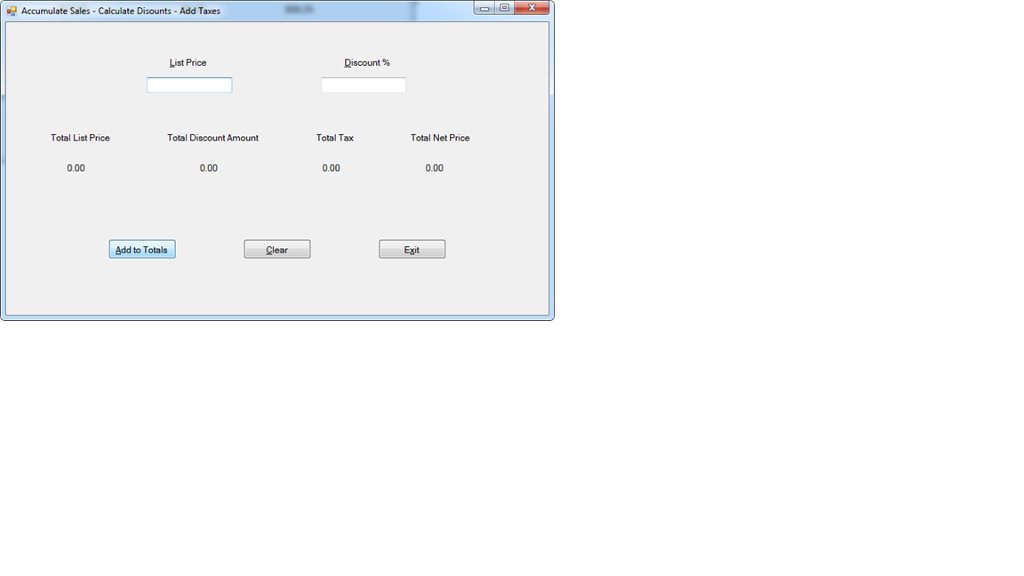
Accumulate Sales . Calculate Disounts-Add Taxes List Price Discount % Total List Price Total Tax Total Discount Amount Total Net Price 0.00 0.00 0.00 0.00 Add to Totals Clear Egit
Step by Step Solution
There are 3 Steps involved in it

Get step-by-step solutions from verified subject matter experts
 Study Help