







Question: do it using tinkercad and breadboard with arduino provide for each task a code and circuit screenshot Build a circuit with LEDs and a pushbutton
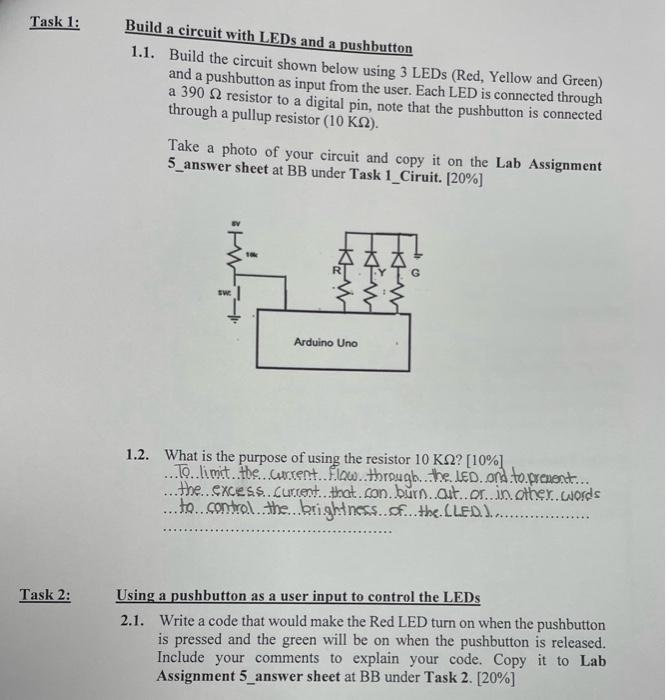
Build a circuit with LEDs and a pushbutton 1.1. Build the circuit shown below using 3 LEDs (Red, Yellow and Green) and a pushbutton as input from the user. Each LED is connected through a 390 resistor to a digital pin, note that the pushbutton is connected through a pullup resistor (10K ). Take a photo of your circuit and copy it on the Lab Assignment 5_answer sheet at BB under Task 1_Ciruit. [20\%] 1.2. What is the purpose of using the resistor 10K ? [10%] ...To. . limit. the current. Flow. through, the leD. ond to prenent... the excess Gurcent. that. con burn aut. or. in other. words to control . the brightness . of .. the (LED. J................ Using a pushbutton as a user input to control the LEDs 2.1. Write a code that would make the Red LED turn on when the pushbutton is pressed and the green will be on when the pushbutton is released. Include your comments to explain your code. Copy it to Lab Assignment 5_answer sheet at BB under Task 2. [20\%]
Step by Step Solution
There are 3 Steps involved in it

Get step-by-step solutions from verified subject matter experts
 Study Help