







Question: Do not use the previous solution in Chegg! (Script) Create a bash script combine that takes 2 or more arguments, call them f1, f2, ...,
Do not use the previous solution in Chegg!
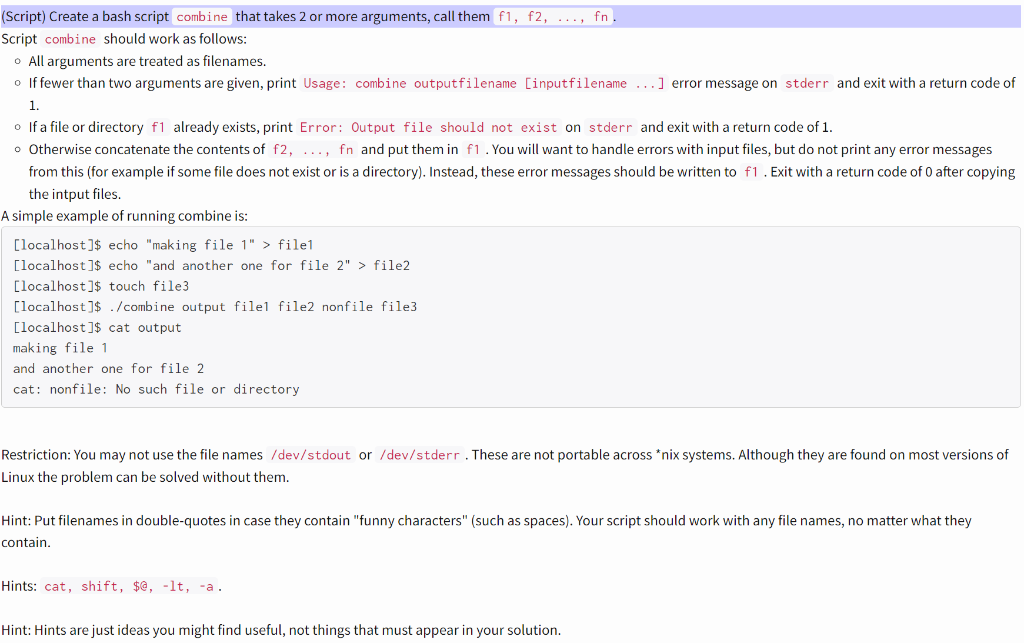
(Script) Create a bash script combine that takes 2 or more arguments, call them f1, f2, ..., fn Script combine should work as follows: All arguments are treated as filenames. If fewer than two arguments are given, print Usage: combine outputfilename [inputfilename ...] error message on stderr and exit with a return code of 1. o If a file or directory f1 already exists, print Error: Output file should not exist on stderr and exit with a return code of 1. . Otherwise concatenate the contents of f2, ..., fn and put them in f1. You will want to handle errors with input files, but do not print any error messages from this (for example if some file does not exist or is a directory). Instead, these error messages should be written to f1. Exit with a return code of 0 after copying the intput files. A simple example of running combine is: [localhost]$ echo "making file 1" > file1 [localhost]$ echo "and another one for file 2" > file2 [localhost]$ touch file3 [localhost]$ ./combine output filel file2 nonfile file3 [localhost]$ cat output making file 1 and another one for file 2 cat: nonfile: No such file or directory Restriction: You may not use the file names /dev/stdout or /dev/stderr. These are not portable across *nix systems. Although they are found on most versions of Linux the problem can be solved without them. Hint: Put filenames in double-quotes in case they contain "funny characters" (such as spaces). Your script should work with any file names, no matter what they contain. Hints: cat, shift, $@,-lt, -a. Hint: Hints are just ideas you might find useful, not things that must appear in your solution
Step by Step Solution
There are 3 Steps involved in it

Get step-by-step solutions from verified subject matter experts
 Study Help