







Question: Draw Page Layout Formulas Data Review View Home Insert X Cut Copy Paste Format Times New... 14 - A A Wrap Text Percentage BI U
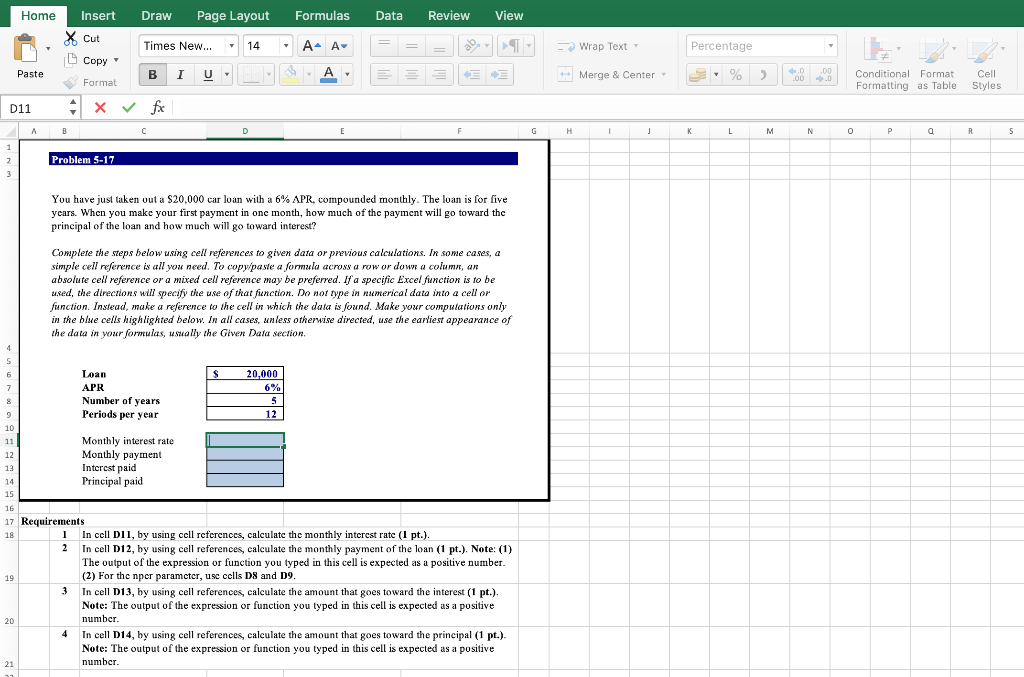
Draw Page Layout Formulas Data Review View Home Insert X Cut Copy Paste Format Times New... 14 - A A Wrap Text Percentage BI U % Merge & Center 2 1.D .00 00 Conditional Format Formatting as Table Cell Styles D11 A X v fx A B E G H 1 j K L M N 0 P a R 5 1 1 2 Problem 5-17 You have just taken out a $20,000 car loan with a 6% APR, compounded monthly. The loan is for five years. When you make your first payment in one month, how much of the payment will go toward the principal of the loan and how much will go toward interest? Complete the steps below using cell references to given data or previous calculations. In some cases, a simple cell reference is all you need. To copy/paste a formula across a row or down a column, ar absolute cell reference or a mixed cell reference may be preferred. If a specific Excel function is to be used, the directions will specify the use of that function. Do not type in numerical data into a cell or function. Instead, make a reference to the cell in which the data is found. Make your computations only in the blue cells highlighted below. In all cases, unless otherwise directed, use the earliest appearance of the data in your formulas, usually the Given Data section, 4 6 7 11 S Loan S 20.000 APR 6% Number of years 5 9 Periods per year 12 10 Monthly interest rate 12 Monthly payment 13 Interest paid 14 Principal paid 15 16 17 Requirements 18 1 In cell D11, by using cell references, calculate the monthly interest rate (1 pt.). 2 In cell D12, by using cell references, calculate the monthly payment of the loan (1 pt.). Note: (1) The output of the expression or function you typed in this cell is expected as a positive number. (2) For the npcr paramctcr, usc cells D8 and D9. In cell D13, by using cell references, calculate the amount that goes toward the interest (1 pt.). Note: The output of the expression or function you typed in this cell is expected as a positive 20 number In cell D14, by using cell references, calculate the amount that goes toward the principal (1 pt.). Note: The output of the expression or function you typed in this cell is expected as a positive 21 number 19 4
Step by Step Solution
There are 3 Steps involved in it

Get step-by-step solutions from verified subject matter experts
 Study Help