







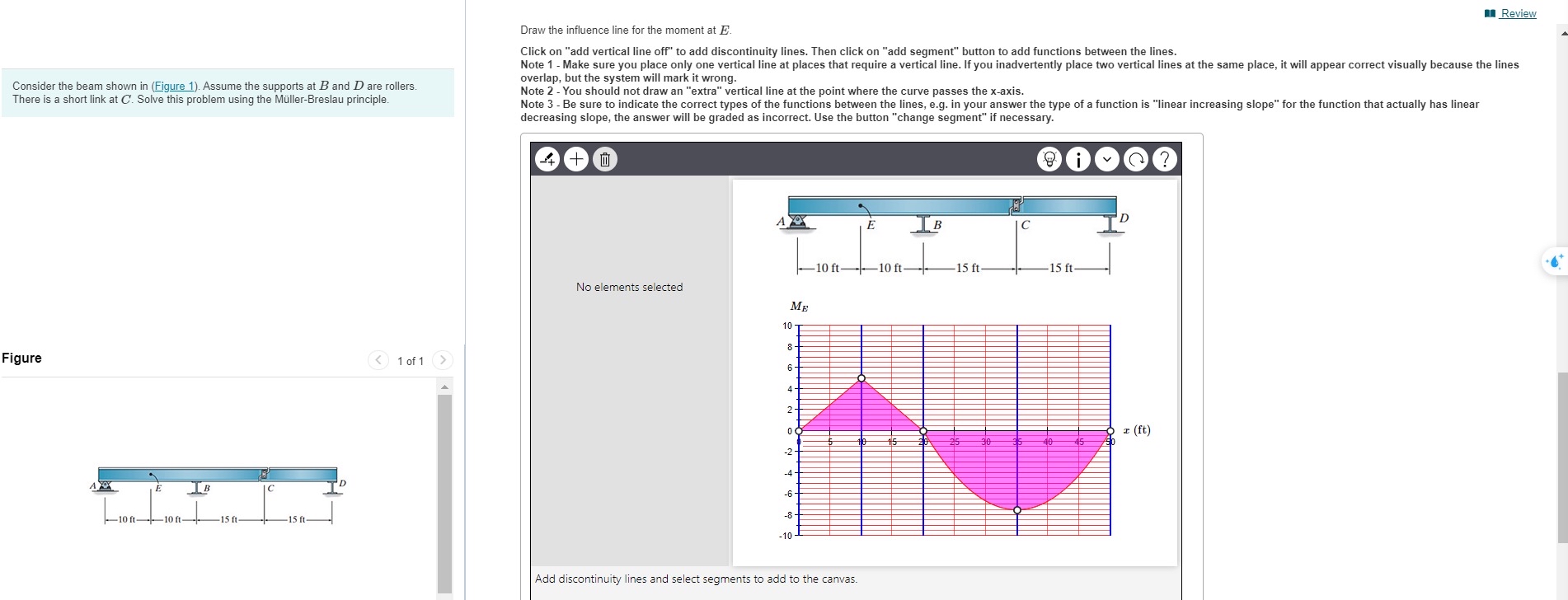
Question: Draw the influence line for the moment at E . Review Click on add vertical line off to add discontinuity lines. Then click on add
Draw the influence line for the moment at
Review
Click on "add vertical line off" to add discontinuity lines. Then click on "add segment" button to add functions between the lines.
Note Make sure you place only one vertical line at places that require a vertical line. If you inadvertently place two vertical lines at the same place, it will appear correct visually because the lines overlap, but the system will mark it wrong.
Note You should not draw an "extra" vertical line at the point where the curve passes the xaxis.
Note Be sure to indicate the correct types of the functions between the lines, eg in your answer the type of a function is "linear increasing slope" for the function that actually has linear decreasing slope, the answer will be graded as incorrect. Use the button "change segment" if necessary.
Consider the beam shown in Figure Assume the supports at and are rollers. There is a short link at Solve this problem using the MllerBreslau principle.
Figure
of
No elements selected
Add discontinuity lines and select segments to add to the canvas.
Step by Step Solution
There are 3 Steps involved in it
1 Expert Approved Answer
Step: 1 Unlock

Question Has Been Solved by an Expert!
Get step-by-step solutions from verified subject matter experts
Step: 2 Unlock
Step: 3 Unlock
 Study Help