







Question: E - commerce Checkout Process Details Objective: Develop a comprehensive set of Cucumber feature files and step definitions to automate the checkout process for an
Ecommerce Checkout Process
Details
Objective: Develop a comprehensive set of Cucumber feature files and step definitions to automate the checkout process for an ecommerce website. This should include testing various scenarios, such as adding items to the cart, applying coupons, updating shipping details, and processing payments.
Requirements:
Setup:
o Use Java and Maven for project setup.
o Ensure CucumberJava, CucumberJUnit, and Selenium WebDriver are included in your Maven dependencies.
o Set up your environment to test on multiple browsers eg Chrome, Firefox, Edge
Feature Files:
o Create multiple feature files under the srctestresourcesfeatures directory, each focusing on different aspects of the checkout process:
CartManagement.feature
CouponApplication.feature
ShippingDetails.feature
PaymentProcessing.feature
o Each feature file should contain multiple scenarios, including both happy and unhappy paths.
Scenarios Example:
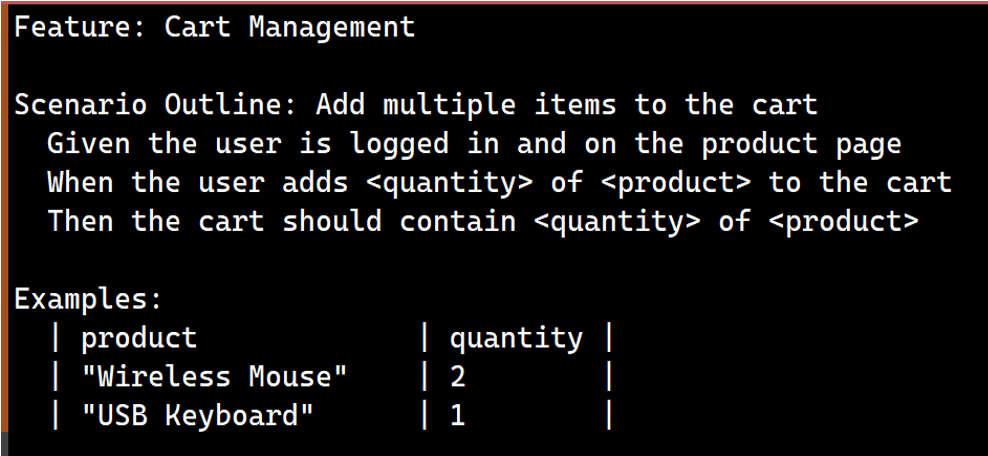
o Heres a sample scenario for the CartManagement.feature:
Step Definitions:
o Implement the step definitions for each scenario in Java, using Selenium WebDriver to interact with the web elements.
o Use Cucumbers Data Table or Scenario Outline features for datadriven testing.
CrossBrowser Testing:
o Configure your Selenium WebDriver to allow for testing across multiple browsers.
o Use Cucumber tags to selectively run tests on different browsers.
Advanced Techniques:
o Implement Cucumber Hooks @Before, @After to handle setup and teardown activities, such as clearing cookies or taking screenshots on failure.
o Use Cucumbers @Tag feature to manage test execution, creating tags for different test suites eg @smoke, @regression
Documentation:
o Provide detailed comments in your step definitions and feature files to explain the purpose of each step and scenario.
o Include a comprehensive README file with instructions on how to run the tests, including setup for crossbrowser testing and any necessary environment configurations.
Bonus Challenges:
o Integrate with a Continuous Integration CI system to automatically run your tests.
o Add performance checks to ensure that the checkout process completes within a reasonable time.Feature: Cart Management
Scenario Outline: Add multiple items to the cart
Given the user is logged in and on the product page
When the user adds
Step by Step Solution
There are 3 Steps involved in it
1 Expert Approved Answer
Step: 1 Unlock

Question Has Been Solved by an Expert!
Get step-by-step solutions from verified subject matter experts
Step: 2 Unlock
Step: 3 Unlock
 Study Help