





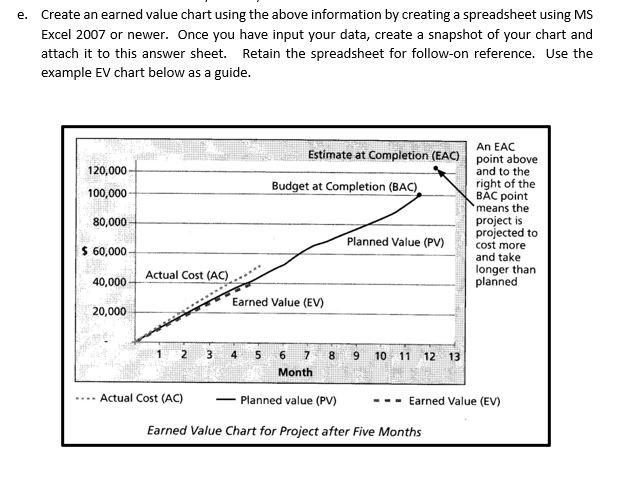
Question: e. Create an earned value chart using the above information by creating a spreadsheet using MS Excel 2007 or newer. Once you have input your
e. Create an earned value chart using the above

e. Create an earned value chart using the above information by creating a spreadsheet using MS Excel 2007 or newer. Once you have input your data, create a snapshot of your chart and attach it to this answer sheet. Retain the spreadsheet for follow-on reference. Use the example EV chart below as a guide. 120,000 100,000 80,000 An EAC Estimate at Completion (EAC) point above and to the Budget at Completion (BAC). right of the BC point means the project is projected to Planned Value (PV) cost more and take Actual Cost (AC) longer than planned Earned Value (EV) $ 60,000 40,000 20,000 3 4 5 8 9 6 7 Month 10 11 12 13 Actual Cost (AC) Planned value (PV) Earned Value (EV) Earned Value Chart for Project after Five Months

Step by Step Solution

There are 3 Steps involved in it

1 Expert Approved Answer
Step: 1 Unlock blur-text-image

Question Has Been Solved by an Expert!

Get step-by-step solutions from verified subject matter experts

Step: 2 Unlock
Step: 3 Unlock

Students Have Also Explored These Related General Management Questions!