







Question: EDIT (CODE IN TEXT): public static void wain(String0 args) { Shape tri1 = new Triangle(); Shape tri2 = new Triangle(); Shape cir1 = new Circle();
EDIT (CODE IN TEXT):
public static void wain(String0 args) { Shape tri1 = new Triangle(); Shape tri2 = new Triangle(); Shape cir1 = new Circle();
Drawing drawing1 = new Drawing(); Drawing drawing2 = new Drawing(); Drawing drawing3 = new Drawing();
drawing3.add(tri2);
drawingLadd(tri1); drawingZ.add(drawing3);
drawing1.add(cir1); drawing1.add(drawing2);
drawing1.setColour("Green"); drawing2.setColour('White"); drawing3.setColour("Gold");
drawing1.print(); }
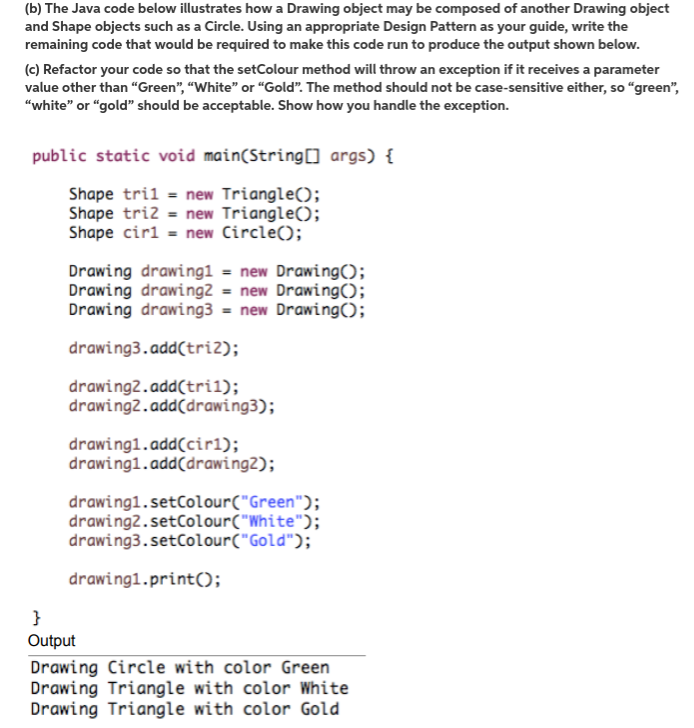
(b) The Java code below illustrates how a Drawing object may be composed of another Drawing object and Shape objects such as a Circle. Using an appropriate Design remaining code that would be required to make this code run to produce the output shown below. (c) Refactor your code so that the setColour method will throw an exception if it receives a parameter value other than Green", "white" or "Gold". The method should not be case-sensitive either, so "green", "white" or gold" should be acceptable. Show how you handle the exception. public static void main(String[] args) { Shape tri1 = new Triangle(): Shape tri2 = new Triangle(): Shape cir1 new Circle(): Drawing drawing1 = new Drawing(): Drawing drawing2 = new Drawing(): Drawing drawing3 = new Drawing(): drawing3.add(tri2): drawing2.add(tri): drawing2.add(drawing3): drawing1.add(cir1): drawing1.add(drawing2): drawing1.setColour("Green"): drawing2.setColour("White"): drawing3.setColour("Gold"): drawing1.print(): } Output Drawing Circle with color Green Drawing Triangle with color White Drawing Triangle with color Gold
Step by Step Solution
There are 3 Steps involved in it

Get step-by-step solutions from verified subject matter experts
 Study Help