







Question: Edit the given code to match the screenshot below. Note the volume of track 1 has been set to a gain of 6. 1
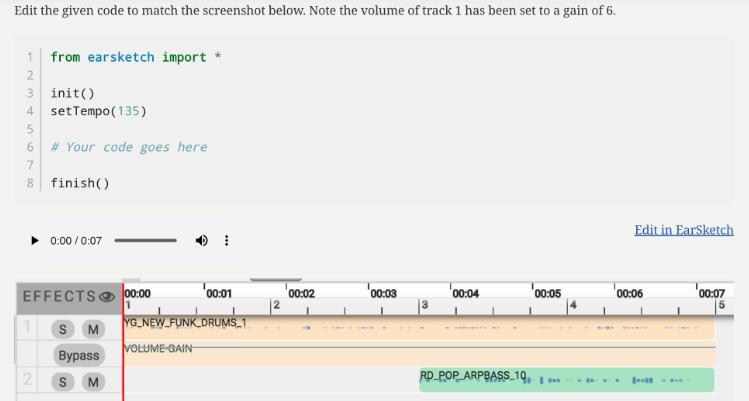
Edit the given code to match the screenshot below. Note the volume of track 1 has been set to a gain of 6. 1 from earsketch import * 2 3 init() 4 setTempo (135) 5 6 7 8 finish() # Your code goes here 1 EFFECTS 2 0:00/0:07 SM Bypass SM I 00:00 1 YG NEW FUNK DRUMS 1 VOLUME-GAIN 00:01 00:02 00:03 00:04 00:05 RD POP ARPBASS 19. Edit in EarSketch 00:06 - *** 00:07 5
Step by Step Solution
★★★★★
3.40 Rating (153 Votes )
There are 3 Steps involved in it
1 Expert Approved Answer
Step: 1 Unlock

The code in the image does not match the screenshot below ... View full answer
Question Has Been Solved by an Expert!
Get step-by-step solutions from verified subject matter experts
Step: 2 Unlock
Step: 3 Unlock
 Study Help