







Question: EEL4834 Program 3 Create a simple scientific calculator program as follows: 1- Display a menu of options according to table. 2- Ask the user to
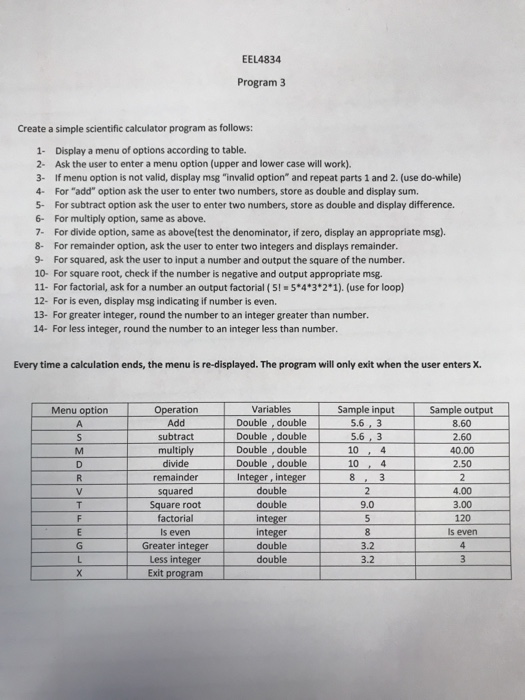
EEL4834 Program 3 Create a simple scientific calculator program as follows: 1- Display a menu of options according to table. 2- Ask the user to enter a menu option (upper and lower case will work). 3- If menu option is not valid, display msg "invalid option" and repeat parts 1 and 2. (use do-while) 4- For "add" option ask the user to enter two numbers, store as double and display sum. 5- For subtract option ask the user to enter two numbers, store as double and display difference. 6- For multiply option, same as above. 7- For divide option, same as above(test the denominator, if zero, display an appropriate msg). 8- For remainder option, ask the user to enter two integers and displays remainder 9- For squared, ask the user to input a number and output the square of the number. 10- For square root, check if the number is negative and output appropriate msg. 11- For factorial, ask for a number an output factorial ( 5! = 5*4*3*2*1). (use for loop) 12- For is even, display msg indicating if number is even. 13- For greater integer, round the number to an integer greater than number. 14- For less integer, round the number to an integer less than number. Every time a calculation ends, the menu is re-displayed. The program will only exit when the user enters X. Variables Double . double Double , double Double double Menu option Operation Add subtract multiply divide Sample input 5.6,3 5.6,3 10 , 4 10, 4 Sample output 8.60 2.60 40.00 2.50 Double , double remainder Integer, integer double double 4.00 3.00 120 ls even Square root factorial 9.0 int s even Greater integer Less integer Exit progranm teger integer double double 3.2 3.2
Step by Step Solution
There are 3 Steps involved in it

Get step-by-step solutions from verified subject matter experts
 Study Help