







Question: Enter a nested lookup function in cell F5 that evaluates the Trans# in cell B5 as well as the Category in cell D5, and returns
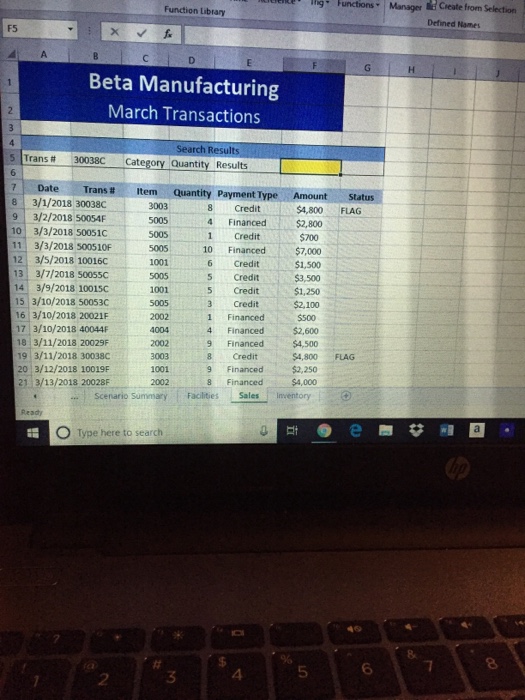
lig Functions ManagerCreate from Selection Function Library Defined Names F5 Beta Manufacturing March Transactions Search Results 5 Trans30038C Category Quantity Results 71 Date Trans # item-Quantity Payment Type Amount tus 8 3/1/2018 30038C 9 3/2/2018 50054F 10 3/3/2018 50051C 11 3/3/2018 500510F 12 3/5/2018 100160 33/7/2018 50055c 14 3/9/2018 10015C 15 3/10/2018 50053C 16 3/10/2018 20021F 7 3/10/2018 40044F 8 3/11/2018 20029F 19 3/11/2018 30038C 20 3/12/2018 10019F 1 3/13/2018 20028F 3003 8 Credit 4 Financed 1 Credit $4,800 FLAG $2,800 5005 1001 5005 1001 10 Financed$7,000 $1,500 $3,500 $1,250 $2,100 6 Credit 5 Credit 5 Credit 3 Credit 1 Financed 4 Financed$2,600 9 Financed $4,500 8 Credit 2002 4004 2002 3003 1001 4,800 FLAG Financed$2,250 8 Financed $4,000 Scenario Summary :Facilities SalesInventory O Type here to search 4 5 2
Step by Step Solution
There are 3 Steps involved in it

Get step-by-step solutions from verified subject matter experts
 Study Help