



Question: 23 Type the Trans# 30038C in cell B5, and select Quantity from the 2 validation list in cell D5. 14 Enter a nested lookup function
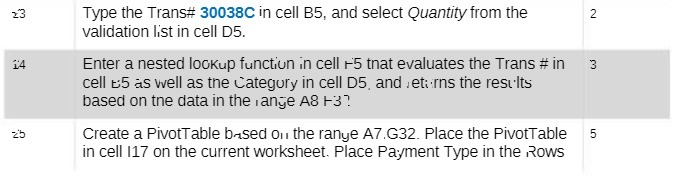
23 Type the Trans# 30038C in cell B5, and select Quantity from the 2 validation list in cell D5. 14 Enter a nested lookup function in cell +5 that evaluates the Trans # in 3 cell t:5 as well as the Category in cell D5, and returns the results based on the data in the range A8 13? 2'b Create a PivotTable based on the range A7.G32. Place the PivotTable 5 in cell 117 on the current worksheet. Place Payment Type in the Rows
Step by Step Solution
There are 3 Steps involved in it
1 Expert Approved Answer
Step: 1 Unlock

Question Has Been Solved by an Expert!
Get step-by-step solutions from verified subject matter experts
Step: 2 Unlock
Step: 3 Unlock