







Question: Enter your name and today's date on the Documentation sheet. To assist the sales staff, create a macro on the Pending Orders Status sheet for
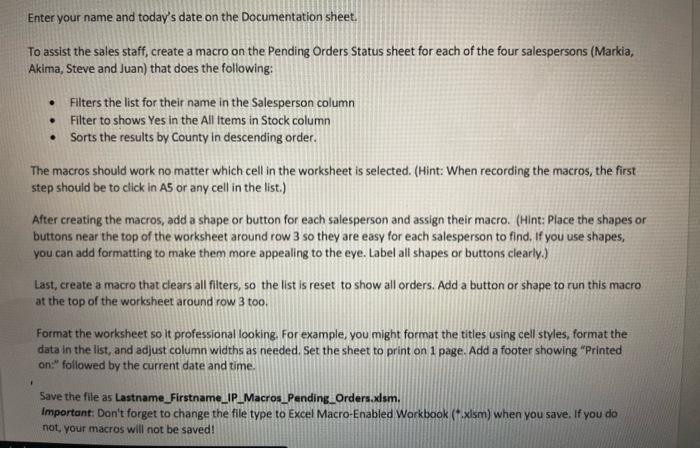
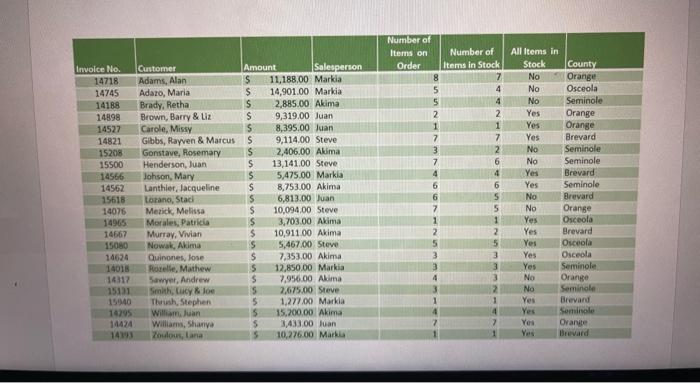
Enter your name and today's date on the Documentation sheet. To assist the sales staff, create a macro on the Pending Orders Status sheet for each of the four salespersons (Markia, Akima, Steve and Juan) that does the following: Filters the list for their name in the Salesperson column Filter to shows Yes in the All items in Stock column Sorts the results by County in descending order. The macros should work no matter which cell in the worksheet is selected. (Hint: When recording the macros, the first step should be to click in A5 or any cell in the list.) After creating the macros, add a shape or button for each salesperson and assign their macro. (Hint: Place the shapes or buttons near the top of the worksheet around row 3 so they are easy for each salesperson to find. If you use shapes, you can add formatting to make them more appealing to the eye. Label all shapes or buttons clearly.) Last, create a macro that clears all filters, so the list is reset to show all orders. Add a button or shape to run this macro at the top of the worksheet around row 3 too. Format the worksheet so It professional looking. For example, you might format the titles using cell styles, format the data in the list, and adjust column widths as needed. Set the sheet to print on 1 page. Add a footer showing "Printed on:" followed by the current date and time. + Save the file as Lastname_Firstname_IP_Macros_Pending_Orders.xlsm. Important: Don't forget to change the file type to Excel Macro-Enabled Workbook (*.xlsm) when you save. If you do not your macros will not be saved! Involce No. Customer 14718 Adams, Alan 14745 Adazo, Maria 14188 Brady, Retha 14898 Brown, Barry & Liz 14527 Carole, Missy 14821 Gibbs, Rayven & Marcus 15208 Gonstave, Rosemary 15500 Henderson, Juan 14566 Johson, Mary 14562 Lanthier, Jacqueline 15618 Lorano, Stad 14076 Merick, Melissa 14965 Morales, Patika 14667 Murray, Vivian 15080 Nowak, Akima 14624 Quinones, lose 14018 Roselle, Mathew 14317 Sawyer, Andrew 15131 Smith, Cucy Joe 15040 Thrush, Stephen 14295 William Juan 14424 Williams, Shanya 14193 Zoulous, Lana Amount Salesperson S 11,188,00 Markia $ 14,901.00 Markia S 2,885.00. Akima s 9,319.00 Juan $ 8,395.00 Juan s 9,114.00 Steve S 2,406.00 Akima s 13,141.00 Steve S 5,475.00 Markis S 8,753.00 Akima S 6,813.00 Juan S 10.094.00 Steve S 3,703.00 Akima $ 10,911.00 Akima S 5,467.00 Steve s 7,353.00 Akima 5 12,850.00 Markia $ 7.956,00 Alima 5 2,675.00 Steve 5 1,277,00 Markia 5 15,200,00 Akima $ 3,433.00 Juan 5 10,276.00 Mark Number of Items on Order 8 5 5 2 1 7 3 7 4 6 6 7 Number of Items in Stock 7 4 4 2. 1 7 2 6 4 6 5 5 1 2 5 3 3 3 2 1 4 7 1 All Items in Stock County No Orange No Osceola No Seminole Yes Orange Yes Orange Yes Brevard No Seminole No Seminole Yes Brevard Yes Seminole No Brevard No Orange Osceola Yes Brevard Yes Osceola Yes Osceola Yes Seminole No Orange No Seminole Yes Brevard Yes Seminole Yes Orange Yes Brevard Yes 5 3
Step by Step Solution
There are 3 Steps involved in it

Get step-by-step solutions from verified subject matter experts
 Study Help