







Question: Estimate the duration of activity D using the PERT method, knowing that it has an optimistic time estimate of 3 days, a most likely estimate
- Estimate the duration of activity D using the PERT method, knowing that it has an optimistic time estimate of 3 days, a most likely estimate of 4 days, and a pessimistic estimate of 11 days.
- Draw a Network Diagram of this project (you can use drawings in Word)
- Find the critical path and the shortest time to complete project
- Calculate the ES, LS, EF, LF, and Slack time for each task in the network (you can enter such information into the boxes of tasks on the network diagram)
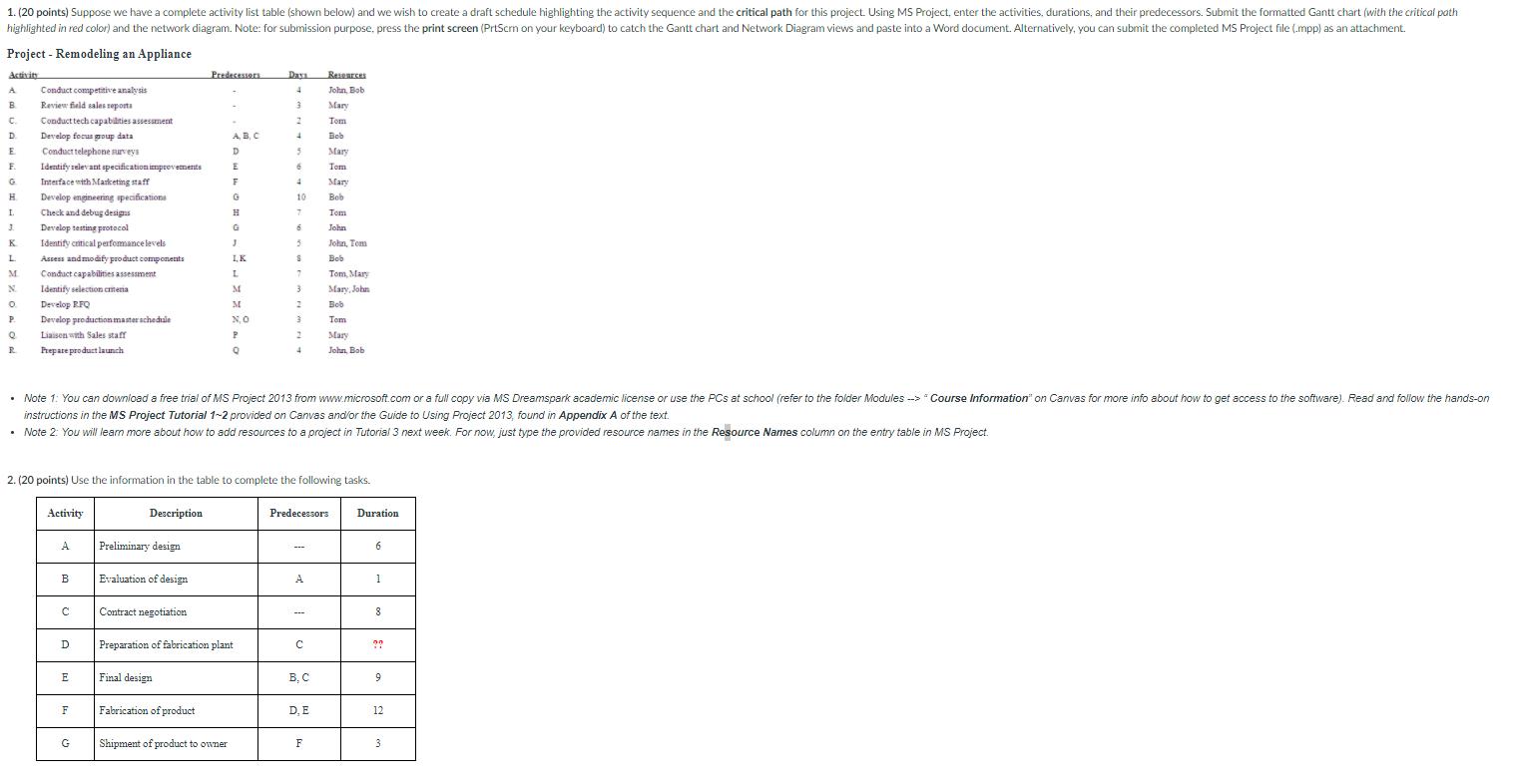
1. (20 points) Suppose we have a complete activity list table (shown below) and we wish to create a draft schedule highlighting the activity sequence and the critical path for this project. Using MS Project, enter the activities, durations, and their predecessors. Submit the formatted Gantt chart (with the critical path highlighted in red color) and the network diagram. Note: for submission purpose, press the print screen (PrtScrn on your keyboard) to catch the Gantt chart and Network Diagram views and paste into a Word document. Alternatively, you can submit the completed MS Project file (.mpp) as an attachment. Project - Remodeling an Appliance Activits Predecessors Daya Researces Conduct competitive analysis Revien fald sales seporta A John, Bob B. Mary C. D. Conducttech capabilties assesament Tem Develop focus goup data AB. C Beb Bch E Conduct telephone surveys D. Mary F. Identify relevant specificationimprevements Tom G. Interface with Marketing staff 4. Mary H. Develop engineering apeciicationa 10 Bob I. Check and debug designs H Tom 3. 6. Develop testing protocol Identify critical perfomance levels John K. John, Tem L Assess andmodify product components I,K Bob M Conduct capabilities assessment 7. Tom, Mary N. Identify selection emena M Mary, John O. Develop RFQ M Bob P. Develop production master schedule N,O Tom Liaisen with Sales staff Mary Frepare product launch John, Bob Note 1: You can download a free trial of MS Project 2013 from www.microsoft.com or a full copy via MS Dreamspark academic license or use the PCs at school (refer to the folder Modules -> " Course Information" on Canvas for more info about how to get access to the software). Read and folow the hands-on instructions in the MS Project Tutorial 1-2 provided on Canvas and/or the Guide to Using Project 2013, found in Appendix A of the text. Note 2: You will learn more about how to add resources to a project in Tutorial 3 next week. For now, just type the provided resource names in the Resource Names column on the entry table in MS Project. 2. (20 points) Use the information in the table to complete the following tasks. Activity Description Predecessors Duration. A Preliminary design B Evaluation of design A 1 Contract negotiation --- D Preparation of fabrication plant ?? Final design B. C E 9 F Fabrication of product D, E 12 G Shipment of product to owner F 3
Step by Step Solution
3.46 Rating (162 Votes )
There are 3 Steps involved in it
Quer 9 Expected Time of activity D 4tm tp ... View full answer

Get step-by-step solutions from verified subject matter experts
 Study Help