





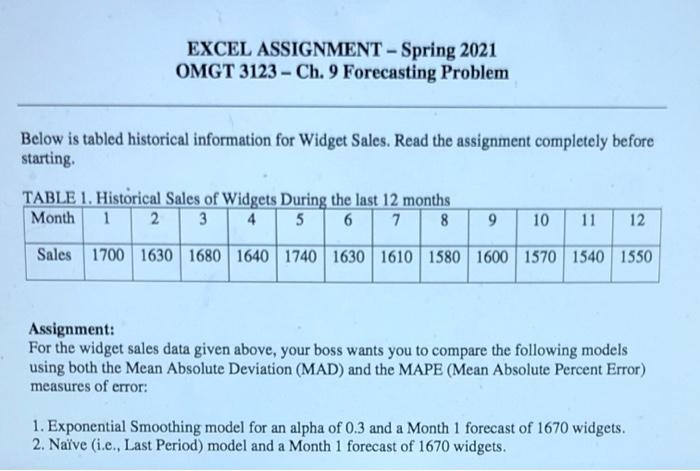
Question: EXCEL ASSIGNMENT - Spring 2021 OMGT 3123 - Ch. 9 Forecasting Problem Below is tabled historical information for Widget Sales. Read the assignment completely before
EXCEL ASSIGNMENT - Spring 2021 OMGT 3123 - Ch. 9
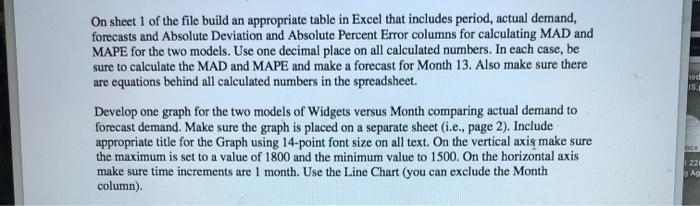
EXCEL ASSIGNMENT - Spring 2021 OMGT 3123 - Ch. 9 Forecasting Problem Below is tabled historical information for Widget Sales. Read the assignment completely before starting TABLE 1. Historical Sales of Widgets During the last 12 months Month 1 23 4 5 6 7 8 9 10 11 12 Sales 1700 1630 1680 1640 1740 1630 1610 1580 1600 1570 1540 1550 Assignment: For the widget sales data given above, your boss wants you to compare the following models using both the Mean Absolute Deviation (MAD) and the MAPE (Mean Absolute Percent Error) measures of error: 1. Exponential Smoothing model for an alpha of 0.3 and a Month 1 forecast of 1670 widgets. 2. Nave (i.e., Last Period) model and a Month 1 forecast of 1670 widgets. ped IS. On sheet 1 of the file build an appropriate table in Excel that includes period, actual demand, forecasts and Absolute Deviation and Absolute Percent Error columns for calculating MAD and MAPE for the two models. Use one decimal place on all calculated numbers. In each case, be sure to calculate the MAD and MAPE and make a forecast for Month 13. Also make sure there are equations behind all calculated numbers in the spreadsheet. Develop one graph for the two models of Widgets versus Month comparing actual demand to forecast demand. Make sure the graph is placed on a separate sheet (i.e. page 2). Include appropriate title for the Graph using 14-point font size on all text. On the vertical axis make sure the maximum is set to a value of 1800 and the minimum value to 1500. On the horizontal axis make sure time increments are 1 month. Use the Line Chart (you can exclude the Month column). 1221 AG

Step by Step Solution

There are 3 Steps involved in it

1 Expert Approved Answer
Step: 1 Unlock blur-text-image

Question Has Been Solved by an Expert!

Get step-by-step solutions from verified subject matter experts

Step: 2 Unlock
Step: 3 Unlock

Students Have Also Explored These Related General Management Questions!