







Question: EXCEL Help Gone through problems 1-2 and need some help and explanation for problem 3 Problem 1 Go to the Income Survey sheet. Make a
EXCEL Help
Gone through problems 1-2 and need some help and explanation for problem 3
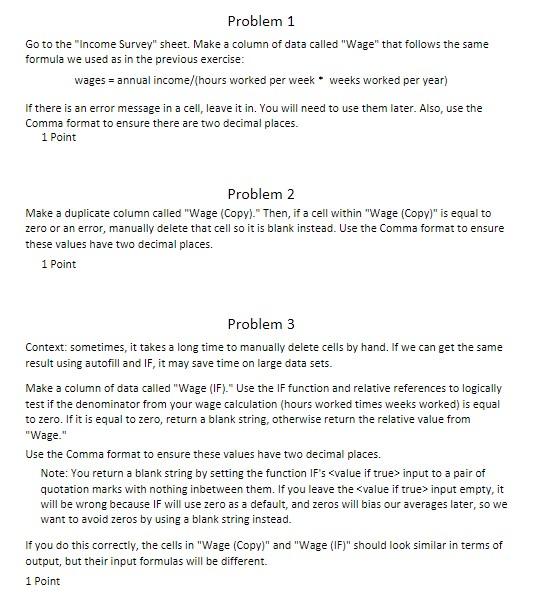
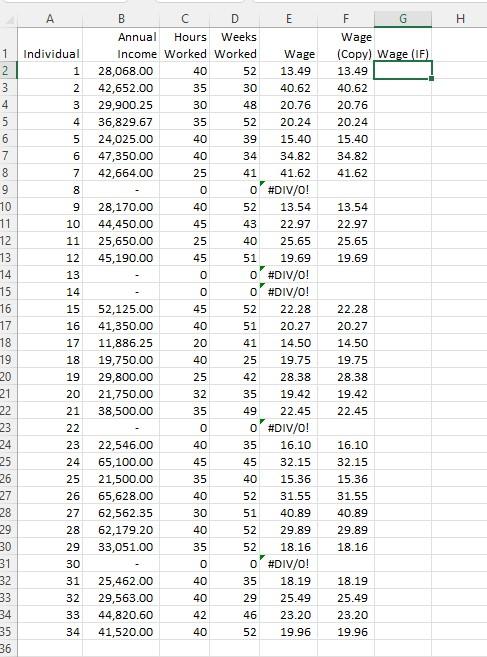
Problem 1 Go to the "Income Survey" sheet. Make a column of data called "Wage" that follows the same formula we used as in the previous exercise: wages = annual income/[hours worked per week weeks worked per year) If there is an error message in a cell leave it in. You will need to use them later. Also, use the Comma format to ensure there are two decimal places. 1 Point Problem 2 Make a duplicate column called "Wage (Copy)." Then, if a cell within "Wage (Copy)" is equal to zero or an error, manually delete that cell so it is blank instead. Use the Comma format to ensure these values have two decimal places. 1 Point Problem 3 Context: sometimes, it takes a long time to manually delete cells by hand. If we can get the same result using autofill and IF, it may save time on large data sets. Make a column of data called "Wage (IF)." Use the IF function and relative references to logically test if the denominator from your wage calculation (hours worked times weeks worked) is equal to zero. If it is equal to zero, return a blank string, otherwise return the relative value from "Wage." Use the Comma format to ensure these values have two decimal places. Note: You return a blank string by setting the function IF's
Step by Step Solution
There are 3 Steps involved in it

Get step-by-step solutions from verified subject matter experts
 Study Help