







Question: EXCEL HELP Ix Calculation Worksheet 1) In cell E13, retriete the income limit from the appropriate tax table. Use a nested IF function with Vlookup
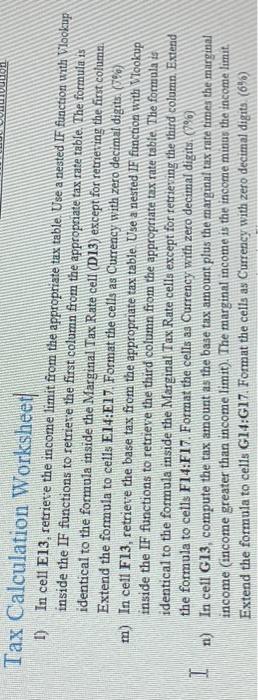
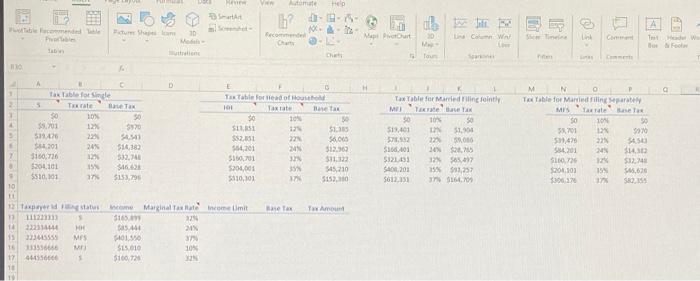
Ix Calculation Worksheet 1) In cell E13, retriete the income limit from the appropriate tax table. Use a nested IF function with Vlookup inside the IF functions to retrieve the first column from the appropsiate tax rate table. The formula is identical to the formula inside the Marginal Tax Rate cell (D13) except for retrieving the first colume Extend the formula to cells E14:E17. Format the cells as Currency with zero decimal digits (fe? m) In cell F13, retrieve the base tax from the appropriate tax table Use a nested IF function with Vtookup inside the IF functions to retrieve the third column from the appropriate tax rate tabie The formula is identical to the formula inside the Marginal Tax Rate cells except for tetriering the third column. Extend the formula to cells F14:F17. Format the cells as Currency with zero decimal digits. (9\%) n) In cell G13, compute the tax amount as the base tax amount plus the marginal tax rate times the marginal income (income greater than income limit). The marginal income is the income minus the income limit. Extend the formula to cells G14:G17. Format the cells as Currency with zero decimal digits (6%)
Step by Step Solution
There are 3 Steps involved in it

Get step-by-step solutions from verified subject matter experts
 Study Help