







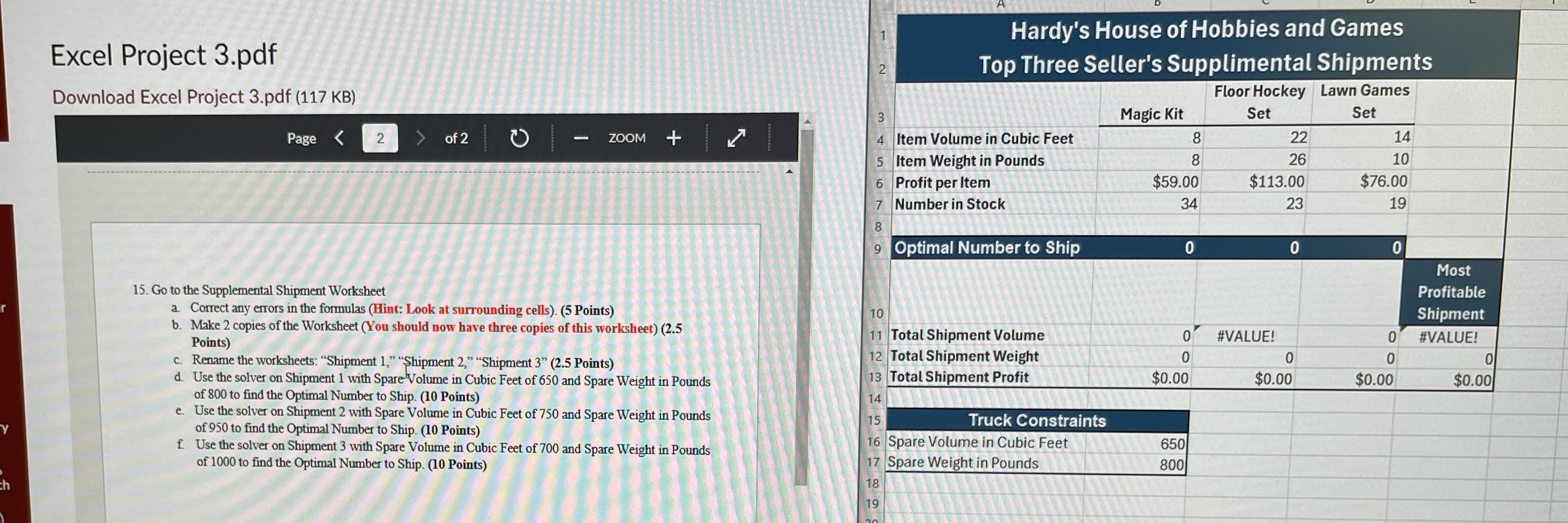
Question: Excel Project 3 . pdf Download Excel Project 3 . pdf ( 1 1 7 KB ) Page 2 of 2 1 5 . Go
Excel Project pdf
Download Excel Project pdf KB
Page
of
Go to the Supplemental Shipment Worksheet
a Correct any errors in the formulas Hint: Look at surrounding cells Points
b Make copies of the Worksheet You should now have three copies of this worksheet Points
c Rename the worksheets: "Shipment "Shipment "Shipment Points
d Use the solver on Shipment with SpareVolume in Cubic Feet of and Spare Weight in Pounds of to find the Optimal Number to Ship. Points
e Use the solver on Shipment with Spare Volume in Cubic Feet of and Spare Weight in Pounds of to find the Optimal Number to Ship. Points
f Use the solver on Shipment with Spare Volume in Cubic Feet of and Spare Weight in Pounds of to find the Optimal Number to Ship. Point
I am looking for the solver code answers.
Step by Step Solution
There are 3 Steps involved in it
1 Expert Approved Answer
Step: 1 Unlock

Question Has Been Solved by an Expert!
Get step-by-step solutions from verified subject matter experts
Step: 2 Unlock
Step: 3 Unlock
 Study Help