





Question: Excel's Solver has been used in the spreadsheet below to solve a linear programming problem with a maximization objective function and all less-than-or-equal to constraints.
Excel's Solver has been used in the spreadsheet
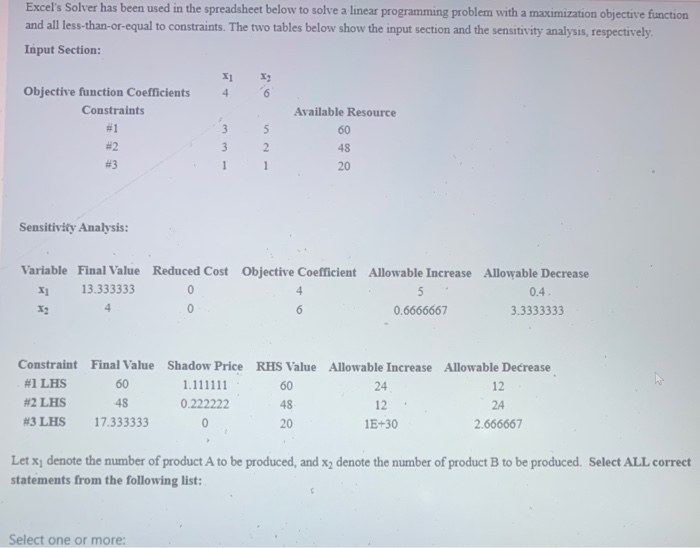
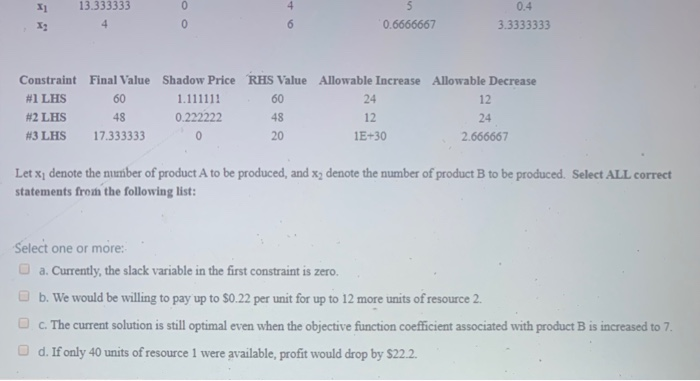
Excel's Solver has been used in the spreadsheet below to solve a linear programming problem with a maximization objective function and all less-than-or-equal to constraints. The two tables below show the input section and the sensitivity analysis, respectively. Input Section: 4 6 Objective function Coefficients Constraints Available Resource 3 5 Sensitivity Analysis: Variable Final Value Reduced Cost Objective Coefficient Allowable Increase Allowable Decrease X 13.333333 5 0.6666667 3.3333333 0.4 60 Constraint Final Value Shadow Price RHS Value Allowable Increase Allowable Decrease #1 LHS 1.111111 24 12 #2 LHS 0.222222 12 24 #3 LHS 17.333333 0 1E+30 2.666667 20 Let x, denote the number of product A to be produced, and x2 denote the number of product B to be produced. Select ALL correct statements from the following list: Select one or more: X 13.333333 0.6666667 3.3333333 Constraint Final Value Shadow Price RHS Value Allowable Increase Allowable Decrease #1 LHS 60 1.111111 60 #2 LHS 48 0.222222 4 8 #3 LHS 17.333333 0 - 20 1E+30 2.666667 12 24 Let x; denote the nunber of product A to be produced, and x, denote the number of product B to be produced. Select ALL correct statements from the following list: Select one or more: a. Currently, the slack variable in the first constraint is zero. b. We would be willing to pay up to 80.22 per unit for up to 12 more units of resource 2. c. The current solution is still optimal even when the objective function coefficient associated with product B is increased to 7. d. If only 40 units of resource 1 were available, profit would drop by $22.2

Step by Step Solution

There are 3 Steps involved in it

1 Expert Approved Answer
Step: 1 Unlock blur-text-image

Question Has Been Solved by an Expert!

Get step-by-step solutions from verified subject matter experts

Step: 2 Unlock
Step: 3 Unlock

Students Have Also Explored These Related General Management Questions!