





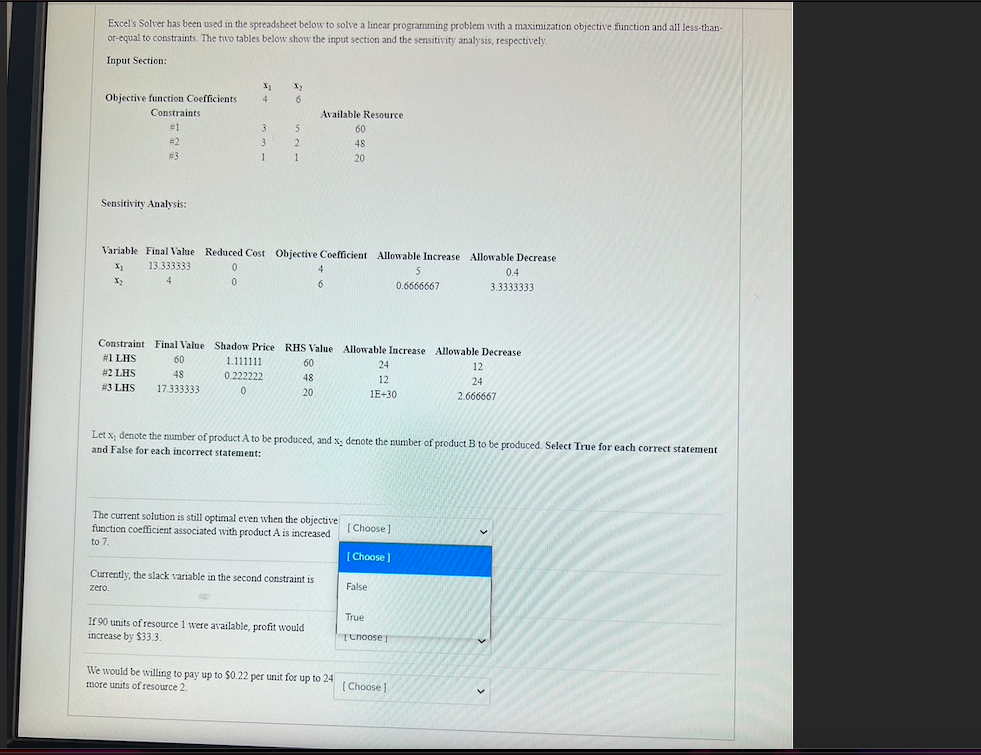
Question: Excel's Solver has been used in the spreadsheet below to solve a linear programming problem with a maximization objective function and all less-than- or equal
Excel's Solver has been used in the spreadsheet

Excel's Solver has been used in the spreadsheet below to solve a linear programming problem with a maximization objective function and all less-than- or equal to constraints. The two tables below show the input section and the sensitivity analysis, respectively Input Section: X 4 X2 6 Objective function Coefficients Constraints 1 #2 3 3 3 3 1 5 2 2 1 1 Available Resource 60 48 20 Sensitivity Analysis: Variable Final Value Reduced Cost Objective Coefficient Allowable Increase Allowable Decrease 13.333333 0 0 4 5 0.4 X2 4 0 6 6 0.6666667 3.3333333 Constraint Final Value Shadow Price RHS Value Allowable Increase Allowable Decrease #1 LHS 60 1.111111 60 24 12 #2 LHS 48 0.222222 48 12 24 #3 LHS 17.333333 0 O 20 1E+30 2.666667 Let X, denote the number of product A to be produced, and X, denote the number of product B to be produced. Select True for each correct statement and False for each incorrect statement: The current solution is still optimal even when the objective function coefficient associated with product A is increased to 7. Choose [Choose Currently, the slack variable in the second constraint is zero False If 90 units of resource 1 were available, profit would increase by $33.3 True Tenoose We would be willing to pay up to 50.22 per unit for up to 24 more units of resource 2. [Choose]

Step by Step Solution

There are 3 Steps involved in it

1 Expert Approved Answer
Step: 1 Unlock blur-text-image

Question Has Been Solved by an Expert!

Get step-by-step solutions from verified subject matter experts

Step: 2 Unlock
Step: 3 Unlock

Students Have Also Explored These Related General Management Questions!