







Question: Exercise 1 4 - 1 Modify the Product Manager application In this exercise, you will modify and enhance the Product Manager application described in this
Exercise Modify the Product Manager application
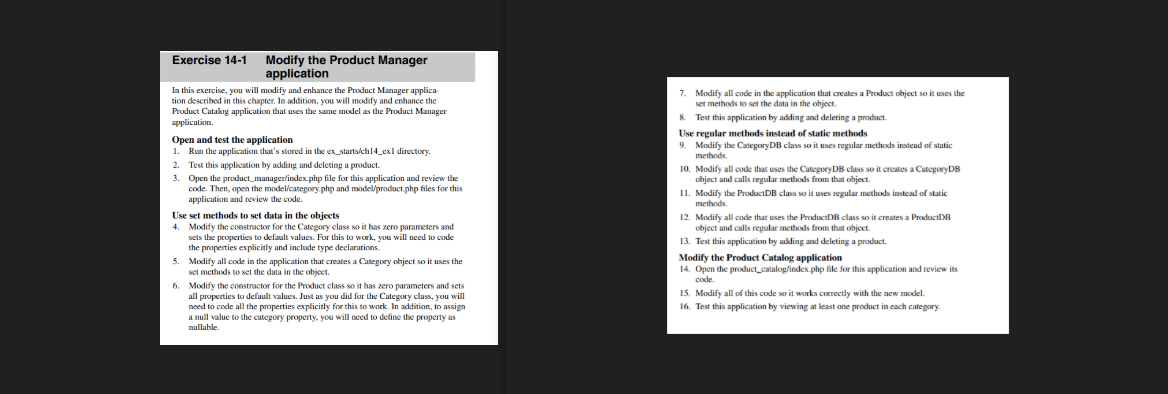
In this exercise, you will modify and enhance the Product Manager application described in this chapter. In addition, you will modify and enhance the Product Catalog application that uses the same model as the Product Manager application.
Open and test the application
Run the application that's stored in the exstartschexl directury.
Test this application by adding and deleting a product.
Open the productmanagerindexphp file for this application and review the code. Then, open the modelcategoryphp and modelprodactphp files for this application and review the code.
Use set methods to set data in the objects
Modify the constructor for the Category class so it has zero parameters and sets the properties to default values. For this to work, you will need to code the properties explicitly and include type declarations.
Modify all code in the application that creates a Category object so it uses the set methods to set the data in the object.
Modify the constructor for the Product class so it has zero parameters and sets all properties to default values. Just as you did for the Category class, you will noed to code all the properties explicitly for this to work. In addition, to assign a null value to the category property, you will need to define the property as mullable.
Modify all code in the application that creates a Product object so it uses the set methods to set the data in the object.
Test this application by adding and deleting a product.
Use regular methods instead of static methods
Modify the CategoryDB class so it uses regular methods instead of static methods.
Modify all code that uses the CategoryDB class so it creates a CategoryDB object and calls regular methods from that object.
Modify the ProductDB class so it uses regular methods instead of static methods.
Modify all code that uses the ProductDB class so it creates a ProductDB object and calls regular methods from that object.
Test this application by abling and deleting a product.
Modify the Product Catalog application
Open the productcataloglindex.php file for this application and review its code.
Modify all of this code so it works correctly with the new model.
Test this application by viewing at least one product in each category.
Using Murach's PHP and MySQL th Edition
A screenshot of the solution of the practice assignment, thank you :)
Step by Step Solution
There are 3 Steps involved in it
1 Expert Approved Answer
Step: 1 Unlock

Question Has Been Solved by an Expert!
Get step-by-step solutions from verified subject matter experts
Step: 2 Unlock
Step: 3 Unlock
 Study Help