







Question: EXERCISE 1 (4 points) Difficulty: Easy DESCRIPTION: In this part of the Project, you will create the requested matrices in the Live Script by using
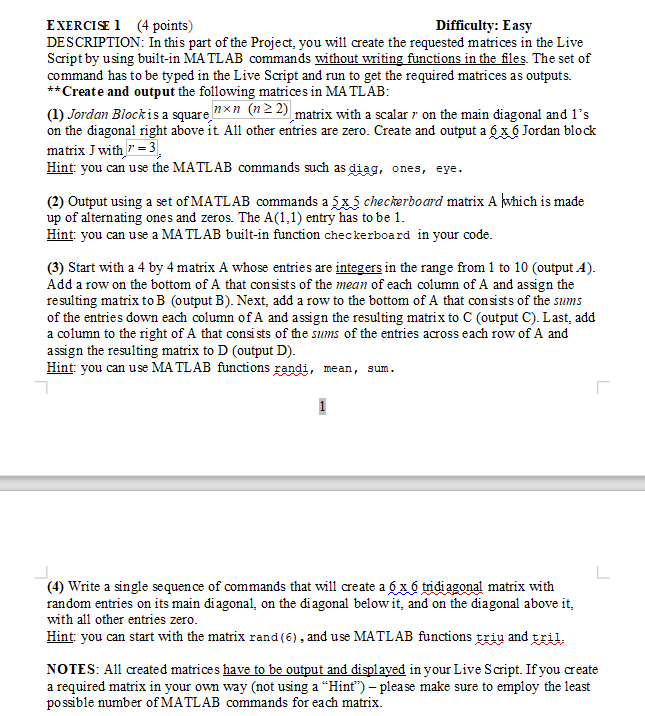
EXERCISE 1 (4 points) Difficulty: Easy DESCRIPTION: In this part of the Project, you will create the requested matrices in the Live Script by using built-in MATLAB commands without writing functions in the files. The set of command has to be typed in the Live Script and run to get the required matrices as outputs. ** Create and output the following matrices in MATLAB: (1) Jordan Block is a square n (n 2 2), matrix with a scalar r on the main diagonal and l's on the diagonal right above it All other entries are zero. Create and output a 6 x Jordan block matrix J with r = 3 Hint: you can use the MATLAB commands such as diag, ones, eye. (2) Output using a set of MATLAB commands a 3x3 checkerboard matrix Alwhich is made up of alternating ones and zeros. The A(1.1) entry has to be 1. Hint: you can use a MATLAB built-in function checkerboard in your code. (3) Start with a 4 by 4 matrix A whose entries are integers in the range from 1 to 10 (output A). Add a row on the bottom of A that consists of the mean of each column of A and assign the resulting matrix to B (output B). Next, add a row to the bottom of A that consists of the sums of the entries down each column of A and assign the resulting matrix to C (output C). Last, add a column to the right of A that consists of the sums of the entries across each row of A and assign the resulting matrix to D (output D). Hint: you can use MATLAB functions randi, mean, sum. (4) Write a single sequence of commands that will create a x6 tridiagonal matrix with random entries on its main diagonal, on the diagonal below it, and on the diagonal above it, with all other entries zero. Hint: you can start with the matrix rand(6), and use MATLAB functions triu and tril. NOTES: All created matrices have to be output and displayed in your Live Script. If you create a required matrix in your own way (not using a Hint) please make sure to employ the least possible number of MATLAB commands for each matrix. EXERCISE 1 (4 points) Difficulty: Easy DESCRIPTION: In this part of the Project, you will create the requested matrices in the Live Script by using built-in MATLAB commands without writing functions in the files. The set of command has to be typed in the Live Script and run to get the required matrices as outputs. ** Create and output the following matrices in MATLAB: (1) Jordan Block is a square n (n 2 2), matrix with a scalar r on the main diagonal and l's on the diagonal right above it All other entries are zero. Create and output a 6 x Jordan block matrix J with r = 3 Hint: you can use the MATLAB commands such as diag, ones, eye. (2) Output using a set of MATLAB commands a 3x3 checkerboard matrix Alwhich is made up of alternating ones and zeros. The A(1.1) entry has to be 1. Hint: you can use a MATLAB built-in function checkerboard in your code. (3) Start with a 4 by 4 matrix A whose entries are integers in the range from 1 to 10 (output A). Add a row on the bottom of A that consists of the mean of each column of A and assign the resulting matrix to B (output B). Next, add a row to the bottom of A that consists of the sums of the entries down each column of A and assign the resulting matrix to C (output C). Last, add a column to the right of A that consists of the sums of the entries across each row of A and assign the resulting matrix to D (output D). Hint: you can use MATLAB functions randi, mean, sum. (4) Write a single sequence of commands that will create a x6 tridiagonal matrix with random entries on its main diagonal, on the diagonal below it, and on the diagonal above it, with all other entries zero. Hint: you can start with the matrix rand(6), and use MATLAB functions triu and tril. NOTES: All created matrices have to be output and displayed in your Live Script. If you create a required matrix in your own way (not using a Hint) please make sure to employ the least possible number of MATLAB commands for each matrix
Step by Step Solution
There are 3 Steps involved in it

Get step-by-step solutions from verified subject matter experts
 Study Help