







Question: Exercise 2: Planning Shared Folders In this exercise, you plan how to share resources on servers in the main office of a manufacturing company. Record
Exercise 2: Planning Shared Folders
In this exercise, you plan how to share resources on servers in the main office of a manufacturing company. Record your decisions in the table at the end of this exercise. Figure 17.2 illustrates a partial folder structure for the servers at the manufacturing company. 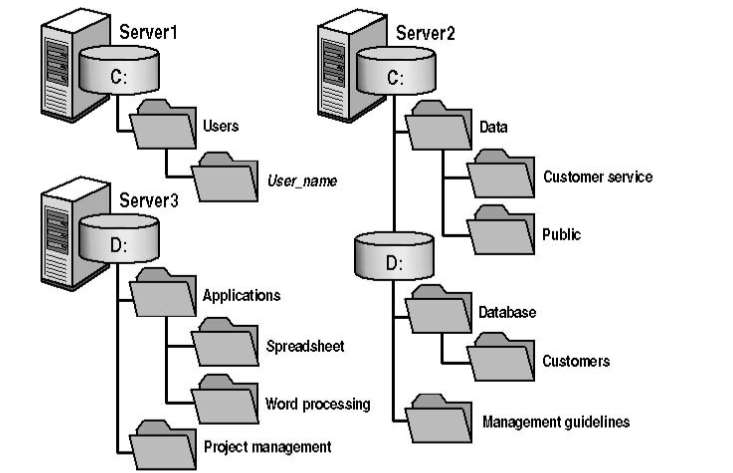
Figure 13.2 A partial folder structure for the servers at a manufacturing company
You need to make resources on these servers available to network users. To do this, determine which folders to share and which permissions to assign to groups, including the appropriate built-in groups. Base your planning decisions on the following criteria:
- Members of the Managers group need to read and revise documents in the Management Guidelines folder. Nobody else should have access to this folder.
- Administrators need complete access to all shared folders, except for Management Guidelines.
- The customer service department needs its own network location to store working files. All customer service representatives are members of the Customer Service group.
- All employees need a network location to share information with each other.
- All employees need to use the spreadsheet, database, and word processing software.
- Only members of the Managers group should have access to the project management software.
- Members of the CustomerDBFull group need to read and update the customer database.
- Members of the CustomerDBRead group need to read only the customer database.
- Each user needs a private network location to store files, which must be accessible only to that user.
Record your answers in this table.
| Folder name and location | Shared name | Groups and permissions |
| Example: |
|
|
| Management Guidelines | MgmtGd | Managers: Full Control |
|
|
|
|
|
|
|
|
|
|
|
|
|
|
|
|
|
|
|
|
|
|
|
|
|
|
|
|
|
|
|
|
|
|
|
|
|
|
|
|
|
|
|
|
|
|
|
|
|
|
|
|
|
|
|
|
|
|
|
|
|
|
|
|
|
|
|
|
|
|
|
|
Server1 Server2 C: C: Users Data User_name Customer service Server3 D: Public D: Applications Database Spreadsheet Customers Word processing Management guidelines Project management
Step by Step Solution
There are 3 Steps involved in it

Get step-by-step solutions from verified subject matter experts
 Study Help